Alexander Lam
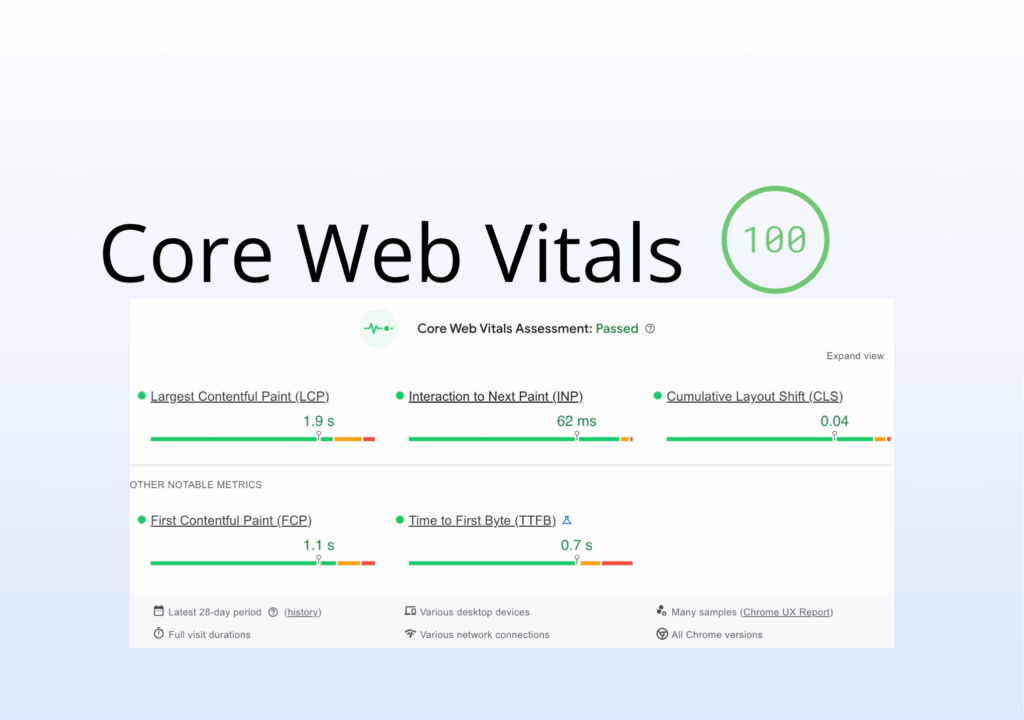
Core Web Vitals in 2026: what changed, how INP replaces FID, and why page experience impacts SEO and conversions. Learn how to improve LCP, CLS, and INP for better rankings, faster site speed, and stronger Shopify performance.
Key Takeaways
→ Core Web Vitals are now a baseline for SEO. They act as a ranking factor tied to page experience. If your site fails them, your rankings are limited before content can compete.
→ INP replaces FID and exposes real performance issues. Interactivity is now measured across the full session, making JavaScript, apps, and main-thread blocking critical to fix.
→ Field data determines success, not test scores. Google uses real user data from CrUX and Search Console. Lighthouse helps diagnose issues, but only consistent real-world performance passes Core Web Vitals.
Why Core Web Vitals Still Matter in 2026
If you run a Shopify store, you’ve heard “page speed matters” enough to ignore it. In 2026, you can’t. Core Web Vitals now play a direct role in SEO (search engine optimization) and whether your store ranks or gets buried.

And if you assume your store is performing well, the data says otherwise. Most websites score far below expectations in PageSpeed tests, even when they appear fast on the surface.
What used to be loose web performance metrics is now a defined system tied to page experience. Google doesn’t just evaluate what’s on your page, but how it feels to use. Core Web Vitals make that measurable.
For Shopify stores, every key page is affected. Product pages, collections, and checkout all depend on site speed and user experience (UX). Slow-loading images or laggy interactions don’t just frustrate users. They increase bounce rate and cost you visibility and sales.
The shift is simple. Performance is no longer optional. If your store fails to meet Google’s thresholds, you are already behind competitors who do.
If you want a deeper breakdown of how site speed impacts conversions and rankings, see our guide on Shopify page speed optimization.
Core Web Vitals Explained (2026 Refresher)
Before fixing anything, you need to understand what Core Web Vitals actually measure. These are three focused web performance metrics, each tied to a different part of the user experience (UX).

The Three Core Metrics
Largest Contentful Paint (LCP) measures loading performance. It tracks how long the main visible element loads, usually your hero or product image. The target is under 2.5 seconds. Over 4 seconds is a problem.
Interaction to Next Paint (INP) measures interactivity. It looks at how quickly your site responds to clicks, taps, and inputs like add-to-cart or filters. The goal is under 200ms. Slow responses here hurt conversions fast.
Cumulative Layout Shift (CLS) measures visual stability. If elements move while loading and cause misclicks, that’s CLS. A good score is below 0.1. Above 0.25 feels broken.
This is also why many stores see rising bounce rates without obvious issues. Poor interactivity often goes unnoticed in analytics but shows up clearly in real user behavior, as explained in our breakdown of ecommerce bounce rate and performance.
The Death of First Input Delay (FID)
First Input Delay (FID) only measured the first interaction. It ignored everything after. A site could pass FID and still feel slow.
That’s why it was replaced by INP, which captures responsiveness across the entire session. It reflects real user experience (UX), not a single moment.
Thresholds and Evaluation
Google uses the 75th percentile rule. Your site passes only if most real users have a good experience. This is based on field data, not lab data.
If you want a broader view of how these metrics fit into overall performance, see our breakdown of Shopify speed performance metrics.
What Changed in 2026 (And What Didn’t)
Core Web Vitals didn’t disappear, but the way Google measures and weights them has changed. In 2026, the focus is more precise and harder to game.

INP Fully Replaces FID
Interaction to Next Paint (INP) has fully taken over from First Input Delay (FID), and now measures every interaction across the session, not just the first click.
For Shopify stores, this exposes real issues. Checkout flows involve multiple actions, and heavy JavaScript that blocks the main thread will drag down interactivity. If your theme is bloated, INP will make it obvious.
Stricter Interpretation of Page Experience
Core Web Vitals are still a ranking factor, but not the deciding one. Google treats page experience as a tie-breaker.
If two pages are equal in content, the one with better site speed and UX wins. But strong content will still beat a faster, low-quality page. You need both to compete.
Introduction of Visual Stability Evolution
Cumulative Layout Shift (CLS) focuses on load stability, but Google is moving toward a broader view of visual stability.
This includes shifts during scrolling or interaction. For Shopify stores using popups, chat widgets, or dynamic elements, stability now matters beyond initial load.
March & February 2026 Core Updates
Recent updates increased the importance of user experience (UX) alongside content. Google now evaluates performance and content together.
Weak performance or weak content can both limit rankings.
What Stayed the Same
Content still leads. Core Web Vitals set the baseline, but content and relevance determine rankings.
Why Core Web Vitals Matter More Than Ever
Performance issues are not just technical problems. They show up directly in user behavior and revenue. To understand the real impact, you need to look at how Core Web Vitals affect business metrics.

Business Impact Metrics
When loading performance drops, bounce rate climbs fast. Pages loading under 2 seconds keep users. Push past 4 or 5 seconds on Largest Contentful Paint (LCP) and you start losing visitors before they see anything.
Interactivity affects conversions just as directly. A slow “Add to Cart” tied to poor Interaction to Next Paint (INP) adds friction at the worst moment. Users don’t analyze it. They leave.
The revenue impact is not subtle. A 1-second delay in site speed can cut conversions by around 7%. That adds up quickly.
Real-World Case Study Insights
Improving Core Web Vitals leads to measurable gains. Better LCP reduces bounce rate. Stronger INP improves add-to-cart actions. Fixing Cumulative Layout Shift (CLS) reduces misclicks and abandoned sessions.
These improvements show up in revenue, not just reports.
Mobile-First Reality
Google prioritizes mobile page experience for rankings, even on desktop results. Your store is judged on how it performs on real mobile devices, not your laptop.
That makes mobile-friendly design and solid responsive design essential. Performance data from real users feeds into the Chrome User Experience Report (CrUX), which directly influences how your site is evaluated.
How Google Actually Measures Core Web Vitals
Before improving anything, you need to understand how Google evaluates performance. The difference between real user data and test data is where most confusion happens.
Field Data vs Lab Data
This is where most people get it wrong. Field data comes from real users on real devices and connections. It’s what Google uses to evaluate Core Web Vitals for rankings. You’ll see it in the Chrome User Experience Report (CrUX) and Google Search Console.
Lab data is simulated. Tools like Lighthouse run controlled tests to help diagnose issues. Useful, but not what you’re graded on.
That’s why a high Lighthouse or PageSpeed Insights score doesn’t guarantee you pass. Your site can look fast in testing and still fail in real-world field data.
Key Data Sources
Chrome User Experience Report (CrUX) is the foundation. It aggregates real user data and feeds Google’s evaluation. Low-traffic pages may only show domain-level data.
Google Search Console gives you the pass or fail view. Its Core Web Vitals report groups pages into “good,” “needs improvement,” or “poor.” This is your baseline.
Real User Monitoring (RUM) tools add deeper insight by tracking performance across actual sessions in real time.
Why Lighthouse Can Mislead You
Lighthouse is for debugging, not validation. A green score doesn’t mean your Core Web Vitals pass in field data.
It runs in a controlled environment that misses real-world issues like third-party scripts, weaker devices, and runtime load from apps.
Metrics like total blocking time (TBT) and time to interactive (TTI) are helpful, but they are proxies, not replacements for INP or LCP.
Use Lighthouse to find problems. Use Google Search Console and CrUX to confirm you fixed them.
This gap between lab scores and real-world performance is more common than most store owners think. In fact, the average PageSpeed score across websites is far lower than expected, which we break down in detail in our analysis of real-world performance benchmarks.
Core Web Vitals Optimization Framework (No Wasted Sprints Edition)
Fixing Core Web Vitals is not about random tweaks. Without a clear structure, it is easy to waste time on low-impact changes.

Prioritization First (Template-Level Thinking)
Shopify stores run on templates, not isolated pages. Product, collection, homepage. Fix the template and you improve every page using it.
Focus your Core Web Vitals work at the template level. Use one representative URL per template in PageSpeed Insights, then validate results in Google Search Console.
A simple approach works. List each template, check its pass or fail status, and prioritize based on traffic. Fix the highest-impact templates first.
Fix Order That Actually Works
Random tweaks won’t move your web performance metrics. Order matters.
- Fix infrastructure first
Slow server response time affects Largest Contentful Paint (LCP) immediately. If your foundation is weak, nothing else holds. - Fix rendering bottlenecks
Remove or defer render blocking resources, optimize scripts, and reduce main-thread load. This is where most site speed issues come from. - Then micro-optimize
Tuning fonts, lazy loading, and CSS helps, but only after the bigger problems are solved. These refine performance, they don’t fix it.
This process sounds simple, but execution is where most stores stall. Maintaining performance across templates, apps, and updates requires constant attention. Tools and services like Hyperspeed exist to handle that ongoing optimization without slowing down your team.
How to Optimize Each Core Web Vital (Practical Guide)
Once priorities are clear, the next step is execution. Each Core Web Vital requires a different approach based on what it actually measures.

Optimizing Largest Contentful Paint (LCP)
Largest Contentful Paint (LCP) is usually the first issue to fix because it directly impacts loading performance and bounce rate. On Shopify, this is often your hero image or main product photo.
Start with server response time (TTFB). If it’s slow, your LCP will be slow. You can’t control Shopify’s infrastructure, but you can reduce liquid render calls, limit app injections, and make sure you’re using Shopify’s CDN effectively.
Next, eliminate render blocking resources. Identify CSS and JavaScript loading in the <head> that delay rendering. Defer non-critical scripts and inline critical CSS for above-the-fold content. This is a major win for heavy themes.
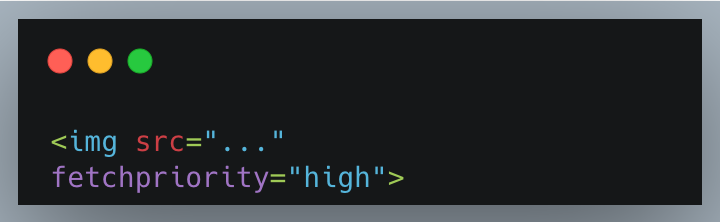
Image optimization is often the biggest gain. Use WebP or AVIF, match images to their display size, and avoid oversized assets. Most importantly, do not lazy-load your LCP image. Your main image should load with:
Finally, check CDN delivery and caching. Shopify’s CDN covers most assets, but app-generated files may bypass it. Audit what’s actually being served.
Optimizing Interaction to Next Paint (INP)
Interaction to Next Paint (INP) reflects real interactivity and is often limited by JavaScript, especially from third-party tools.
Start by auditing every script. Apps, analytics, chat widgets, and testing tools all add load to the main thread. Remove anything unnecessary and confirm scripts are fully removed.
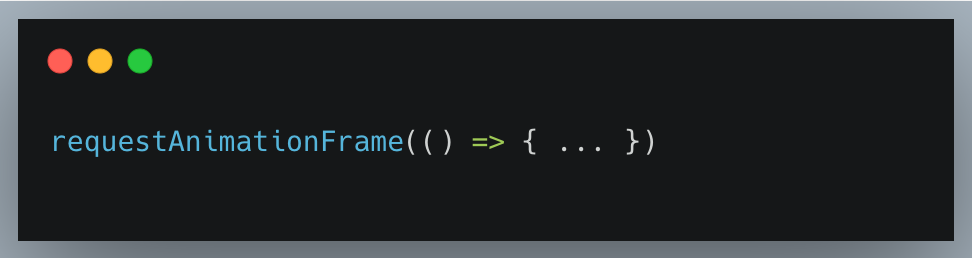
Break up long tasks. Any JavaScript over 50ms blocks interactions. Use Chrome DevTools to identify these and work with developers to split them using:
or:
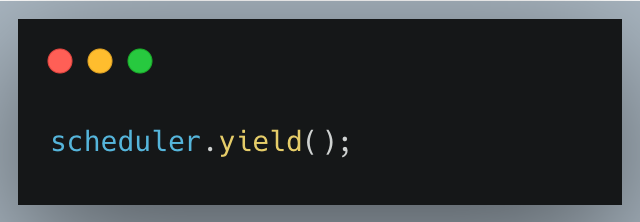
Lazy-load non-critical features. Elements like product carousels should only load when visible, keeping the main thread free for key actions.
Simplify event handlers. Add-to-cart interactions often trigger too many synchronous tasks. Profiling these can reveal delays that should be deferred or reduced.
Optimizing Cumulative Layout Shift (CLS)
Cumulative Layout Shift (CLS) measures visual stability, and most issues come from predictable layout shifts.
Set explicit dimensions for images and videos so the browser reserves space before loading:
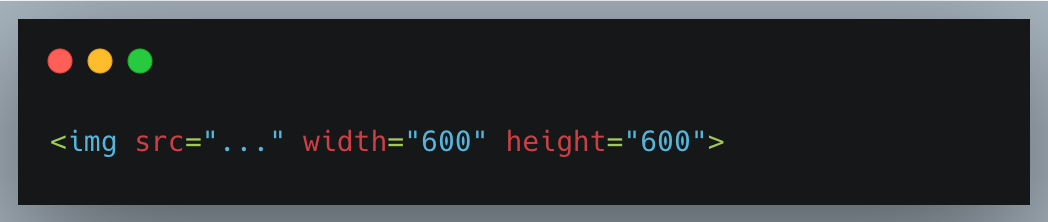
or use CSS:
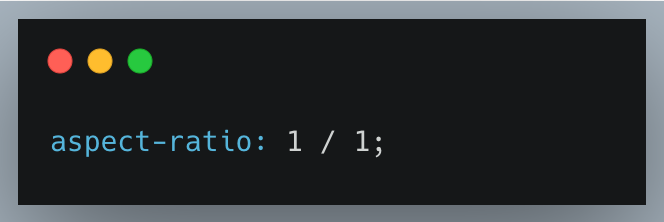
Reserve space for dynamic elements like banners, popups, and embeds. Load them server-side or use fixed-height containers to prevent shifts.
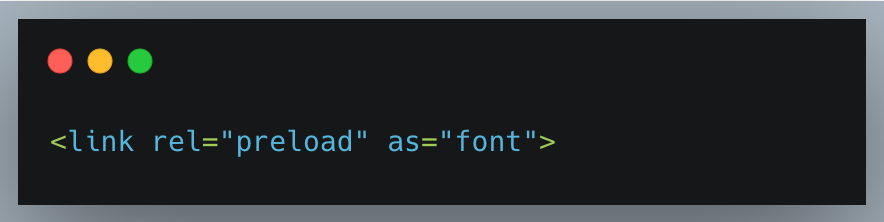
Font loading can also cause layout jumps. Use:
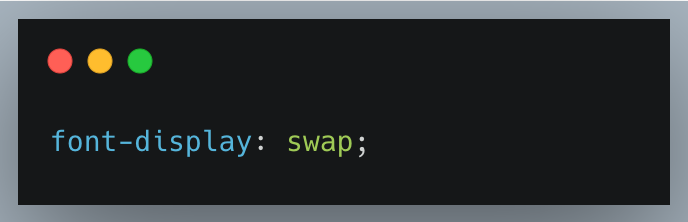
and preload key fonts:
These fixes stabilize layout and improve perceived quality immediately.
Common Failures (And Why Most Sites Still Fail in 2026)
Even with clear guidelines, most sites still fail Core Web Vitals. The reasons are consistent and usually easy to identify once you know what to look for.

The Three Core Failure Types
Less than half of websites pass all three Core Web Vitals, and Shopify stores tend to fail in the same ways.
This is not surprising when you look at real-world data. Most sites underperform significantly in PageSpeed benchmarks, which explains why so many fail Core Web Vitals in practice.
- Largest Contentful Paint (LCP) failures usually come down to poor loading performance caused by unoptimized images or slow server response. In many cases, the fix is structural, not superficial.
- Interaction to Next Paint (INP) is now the most common failure.A store can look fast and still feel slow because the main thread is overloaded. Excess scripts are a common cause of poor interactivity.
- Cumulative Layout Shift (CLS) failures come from weak visual stability. Popups, banners, and images without set dimensions make pages jump during load, which hurts trust and makes users less likely to convert.
The Most Costly Mistakes
The biggest mistake is ignoring field data in Google Search Console. That is what Google uses to evaluate your Core Web Vitals.
Over-trusting Lighthouse is another common problem. A strong score in lab data does not guarantee a good real-world experience. Validate with CrUX.
Third-party scripts are behind many INP issues. Too many apps add too much JavaScript, and that drags down responsiveness.
Poor lazy loading is another frequent mistake. It helps off-screen images, but if applied to the LCP element, it hurts loading performance instead of helping it.
And finally, passing First Input Delay (FID) never guarantees a good INP. They measure different things, so INP needs to be evaluated on its own.
Fixing Core Web Vitals at scale is where most Shopify stores get stuck. Auditing scripts, optimizing themes, and improving real-world field data isn’t something most teams have time to manage continuously.
That’s where performance-focused solutions like Hyperspeed come in – handling ongoing speed optimization so your Core Web Vitals don’t quietly degrade over time.
Core Web Vitals and SEO Strategy
Understanding performance is not enough. You also need to know how much it actually influences search rankings and where it fits in a broader SEO strategy.

How Much Do They Impact Rankings?
Let’s be clear. Core Web Vitals are a confirmed ranking factor, but not the dominant one. Strong content can still outrank faster pages with weak relevance.
What they do is set a baseline. If your page experience and web performance metrics fall below acceptable levels, your rankings are limited. You need to pass that threshold before content and authority can fully work.
There is a clear pattern. Pages ranking higher tend to pass Core Web Vitals more often. But performance alone does not drive rankings. It supports them.
Page Experience in a Modern Stack
In 2026, effective SEO (search engine optimization) combines multiple signals. Core Web Vitals, content quality, search intent, and authority all work together.
For Shopify stores, this means balance. Strong content cannot carry poor site speed, and fast performance cannot compensate for weak content.
This extends to AEO and GEO strategies. Pages that perform well and deliver solid user experience (UX) are more likely to be trusted and surfaced in AI-driven results.
Core Web Vitals vs Interactivity — False Tradeoff
Performance and interactivity are not opposing goals. Poor implementation creates the conflict.
The fix is structure. Load critical content first to support loading performance, then enhance progressively with JavaScript. Use code splitting so users only load what they need, and keep the main thread clear for interactions.
Fast and interactive is harder to execute, but it is the standard.
Platform-Specific Considerations
The platform you use introduces its own patterns and limitations that affect Core Web Vitals.

Common Causes of Poor Scores
Across platforms like WordPress and Shopify, the same issues show up.
App and plugin bloat is a major cause. Each addition increases JavaScript, CSS, and requests, which impacts site speed and interactivity over time.
Theme inefficiencies make it worse. Many themes prioritize design over loading performance, with heavy sliders, animations, and unused CSS creating render blocking resources.
Unoptimized assets are still common. Large images, unminified files, and uncompressed resources drag down performance when they are easy to fix.
Beginner-Friendly Fixes
Start with the basics that move the needle fastest.
Enable caching wherever possible. Browser, server, and CDN caching all improve repeat visits and overall page experience.
Focus on image optimization. Use modern formats, compress files, and match images to display size. Even with a CDN, oversized uploads still hurt performance.
If your theme is the issue, simplify it. Lightweight themes built for performance can improve Core Web Vitals faster than patching a heavy one.
Advanced Optimization Techniques
Once the basics are covered, deeper changes improve results.
Code splitting ensures users only load the JavaScript they need, reducing total blocking time (TBT) and improving Interaction to Next Paint (INP).
Script deferral prevents non-critical JavaScript from blocking rendering. This reduces render blocking resources and helps Largest Contentful Paint (LCP).
At scale, server-level improvements matter. Compression, protocol upgrades, and faster response times all support better web performance metrics, especially if TTFB is high.
Proving and Maintaining Performance Improvements
Improving scores is one thing. Knowing when the work is actually complete is where most teams get it wrong.

Definition of Done for Core Web Vitals
“Fixed” does not mean a higher Lighthouse score. It means your pages are marked “Good” in the Core Web Vitals report in Google Search Console.
That result comes from field data, which is what Google uses for ranking. Because of the 28-day window in Chrome User Experience Report (CrUX), performance needs to stay consistent, not spike once.
Monitoring and Regression Prevention
Without monitoring, regressions are guaranteed. A new app, script, or theme update can quietly break your Core Web Vitals.
Track trends using CrUX dashboards and watch for changes in Google Search Console. Set alerts for new “poor” URLs so issues are caught early.
Performance should be part of ongoing maintenance, not something you check after rankings drop.
Pre-Validation Before Deployment
Before launching changes, test their impact. Use Lighthouse and PageSpeed Insights to catch obvious issues early.
If metrics like total blocking time (TBT) or first contentful paint (FCP) get worse in testing, your real-world performance will likely follow.
It is not a perfect prediction, but it is enough to prevent avoidable drops in field data.
After the 2026 Core Updates — What You Should Do
Core updates often cause ranking shifts, but the reasons are not always obvious. The first step is understanding what actually changed.

Post-Update Analysis
If rankings shifted after the 2026 updates, separate performance from content issues first.
Check Google Search Console and your Core Web Vitals. If field data dropped, performance likely played a role. If your scores held steady but rankings fell, the issue is content quality or relevance, not page experience.
Strategy Adjustments
After a core update, recalibrate. Compare your Core Web Vitals, content depth, backlinks, and mobile page experience together.
Stores that recover fastest improve both user experience and content together.
Mistakes to Avoid
Do not over-optimize site speed at the expense of UX. Removing features just to improve loading performance can hurt engagement.
And do not ignore broader SEO (search engine optimization) signals. Core Web Vitals support rankings, but they are not the whole system. Content, links, and relevance still carry significant weight.
The Future of Core Web Vitals
Core Web Vitals are not static. Google continues to evolve how performance and user experience are measured and applied.

Increasing Focus on Real User Experience
Google is moving toward real usage, not simulations. Core Web Vitals are already based on field data, and that focus will deepen.
AI-driven evaluation is shaping how user experience (UX) and page experience are interpreted. Instead of isolated web performance metrics, Google is moving toward a more holistic view. Pages that are fast, usable, and relevant will continue to win.
Potential New Metrics
The current set — Largest Contentful Paint (LCP), Interaction to Next Paint (INP), and Cumulative Layout Shift (CLS) — will not stay static.
New ideas like the Visual Stability Index and metrics around scrolling and perceived load are already being explored. The direction is consistent: measure real user experience (UX) and reward what feels smooth and responsive.
What to Expect Next
Thresholds will tighten. What counts as “good” loading performance today will not hold forever.
Core Web Vitals will also become more embedded in ranking systems. Instead of acting as separate signals, they will blend into overall page quality, alongside content and relevance.
If your store is not consistently passing Core Web Vitals in Google Search Console, the issue is already affecting your rankings and conversions. Start by auditing your performance metrics and identifying the highest-impact fixes.
Compare how fast your store is to a huge sample of other stores. Get benchmarked and find out where you can improve your speed to make more sales. How fast is your Shopify store?
FAQ
What are Core Web Vitals and why do they matter in 2026?
Core Web Vitals are Google’s key web performance metrics that measure loading performance, interactivity, and visual stability. They directly impact page experience and act as a ranking factor in SEO (search engine optimization), influencing visibility, user experience (UX), and conversion rates.
What changed with Core Web Vitals in 2026?
The biggest change is Interaction to Next Paint (INP) replacing First Input Delay (FID), shifting focus to full-session interactivity. Google also strengthened page experience signals using field data from Chrome User Experience Report (CrUX), making real user performance more important than lab data.
How does Google measure Core Web Vitals?
Google measures Core Web Vitals using field data from real users via Chrome User Experience Report (CrUX) and reports results in Google Search Console. Lab data from Lighthouse and PageSpeed Insights helps diagnose issues, but rankings depend on real-world performance, not simulations.
How can I improve Core Web Vitals on a Shopify store?
Improve Core Web Vitals by optimizing image optimization for LCP, reducing render blocking resources, and minimizing JavaScript to improve INP. Use responsive design and mobile-friendly layouts to stabilize CLS. Focus on site speed and prioritize fixes that impact real user experience (UX).
Do Core Web Vitals affect SEO rankings directly?
Yes, Core Web Vitals are a confirmed ranking factor, but not the main one. They influence page experience and act as a threshold for SEO (search engine optimization). Strong content can still rank higher, but poor web performance metrics can limit visibility and increase bounce rate.