Alexander Lam
What is INP and why does it matter for your Shopify store? Learn how Interaction to Next Paint affects responsiveness, SEO rankings, and conversion rate, plus proven ways to improve Shopify INP and fix slow user interactions.
Key Takeaways
→ INP measures real responsiveness, not just load time. Slow interactions like add to cart or product variant changes directly hurt conversion rate and SEO rankings.
→ Shopify stores struggle with INP due to JavaScript, third-party apps, and main thread blocking.
→ Improving INP requires reducing JavaScript, optimizing event handlers, and continuously monitoring performance.
What is INP and Why it Matters for Your Shopify Store
If your Shopify store feels sluggish when someone taps a button, you’re losing money.
Not “maybe” losing money, actually losing it. And the metric that now captures that feeling better than anything else is INP, or Interaction to Next Paint.
For years, Google used first input delay (FID) to measure how quickly a page started responding to a user’s very first tap or click. It wasn’t a bad measure, but it only told part of the story. FID ignored everything that happened after that first interaction; all the add-to-cart clicks, filter buttons, variant selects, and cart drawer opens that make up a real shopping session.
In March 2024, Google replaced FID with INP as an official Core Web Vital, and that change matters a lot for Shopify stores.
INP measures every interaction across a page visit, not just the first one. That’s a big deal because responsiveness is now the standard.
- Slow interactions hurt your SEO rankings because Google uses Core Web Vitals as ranking signals.
- They hurt your conversion rate because frustrated shoppers abandon carts.
- And they hurt your brand because a laggy store just feels cheap, no matter how beautiful the design is.
The connection between interactivity and revenue is direct and measurable. Fix your INP score, and you’ll see it in your analytics.
Core Web Vitals Fundamentals (2026 Update)
Core Web Vitals are Google’s way of measuring how your site actually feels to use. They focus on loading, responsiveness, and visual stability.

These are not abstract scores. They reflect real user experience. If your site is slow or frustrating, users leave. Google notices. Your rankings and revenue take the hit.
The Three Core Metrics
There are three metrics that define performance:
- INP (Interaction to Next Paint): how fast your site responds to user interaction like clicks or add to cart
- LCP (Largest Contentful Paint): how quickly the main content loads
- CLS (Cumulative Layout Shift): whether the layout stays stable while loading
All three matter, but INP is usually the hardest problem on Shopify stores because of heavy JavaScript and interactive elements.
How Core Web Vitals Affect Shopify SEO Rankings
Core Web Vitals are ranking signals, but they will not destroy your rankings overnight.
What they do is limit how competitive you can be. If similar stores have better performance, they win.
Page speed now means the full experience. A site that loads fast but responds slowly is not considered fast.
If you want the full explanation of Core Web Vitals, check out Core Web Vitals 2026.
What is INP (Interaction to Next Paint)?
INP (Interaction to Next Paint) measures how long it takes from a user action to the moment the page visibly responds.
A user clicks, taps, or types. The browser processes that interaction. Then it updates the screen. INP captures that full timeline.
It is the gap between “I did something” and “I see something happen.”
If that gap is too long, the site feels unresponsive. Users do not care whether your code eventually runs. They care that nothing appears to happen.
INP tracks all interactions during a session and reports the worst one, with some protection against extreme outliers. That means a single slow interaction can define your score.
It is not just about JavaScript execution. INP ends when the browser paints the visual update. If the UI does not update quickly, the interaction feels slow even if the logic finished earlier.
The Three Components of INP
Every INP score is made up of three parts:
- Input delay
The time between the user action and when the browser starts handling it. This happens when the main thread is busy. - Processing time
The time it takes for your JavaScript and event handlers to run. - Presentation delay
The time between the end of processing and when the browser updates the UI.
All three contribute to the final score.
Most Shopify optimization work focuses on input delay and processing time, because heavy JavaScript blocks the main thread.
But presentation delay can also be a problem, especially on pages with large DOM structures where rendering takes longer than expected.
What Counts as an Interaction?
INP tracks discrete interactions that matter to users:
- Clicks like add to cart
- Keyboard input in search or forms
- Pointer interactions like opening a cart drawer or tapping a filter button
It does not track continuous actions like scrolling or mouse movement.
Focus on the key moments in a shopping session. Selecting a product variant, applying filters, opening quick view, adding items to cart. These are the interactions INP measures, and these are the ones that shape how fast your store feels.
What Is a Good INP Score?
Google defines three thresholds:
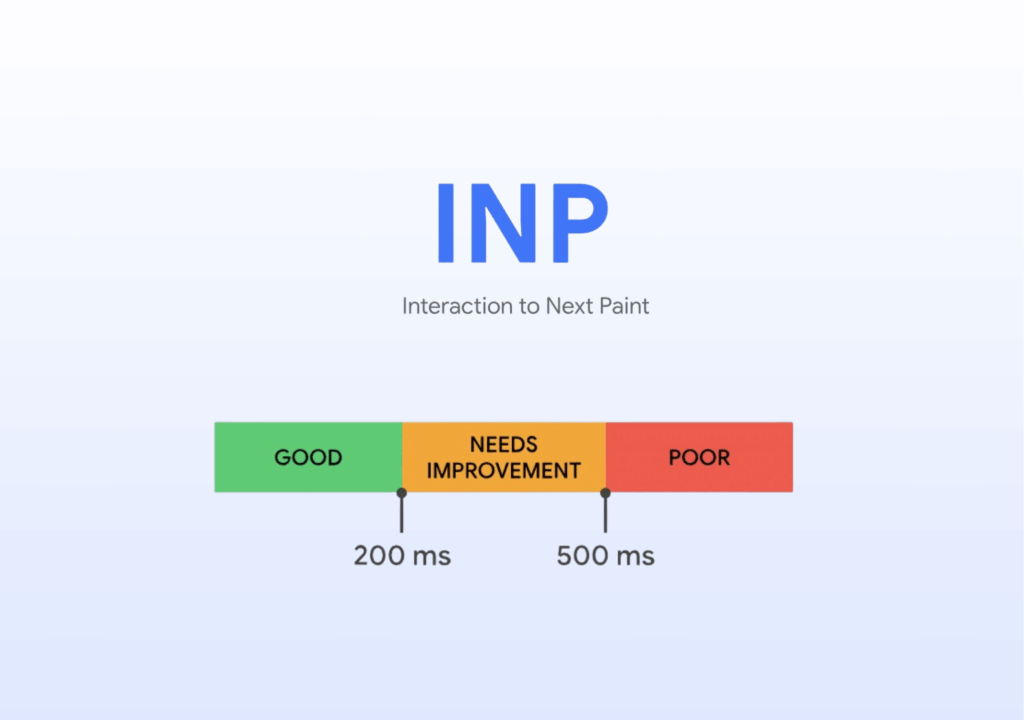
- Good: 200ms or less
- Needs improvement: 200ms to 500ms
- Poor: above 500ms
Shopify stores often struggle to hit the “good” range. Themes, third-party apps, and custom scripts all compete for the main thread.
A single 300ms interaction may feel acceptable. But when multiple interactions behave like that in one session, the experience starts to feel slow and inconsistent.
INP vs First Input Delay (FID)
FID measured only the delay before the first interaction was processed.
That means it ignored everything after the first click. Add to cart, variant changes, cart drawer interactions. None of that counted.
INP fixes this by measuring responsiveness across the entire session. It gives a more accurate view of how your store actually behaves when users interact with it.
In other words, FID measured a first impression. INP measures the full experience.
We audited Shopify stores and found the average PageSpeed score is just 30. This data-backed analysis shows how apps, scripts, images, and CSS impact performance, and what to fix first to improve Core Web Vitals, including INP and conversion rate.
Read the full research: We Audited 1,166 Shopify Stores: Why the Average PageSpeed Score Is Only 30
Why INP is a Problem on Shopify Stores
Shopify stores tend to be heavy on JavaScript.

Themes load scripts for things like product galleries, sticky headers, and animations. Then you install apps for reviews, chat, upsells, and loyalty. Each one adds more JavaScript to the page.
Some of these are render blocking scripts. Others keep running after the page loads. Either way, they compete for the main thread.
When the main thread is busy, it cannot respond to user interaction. That delay is exactly what INP measures.
The 5 Most Common INP Issues
The biggest INP offender we consistently see on Shopify stores is analytics scripts. Facebook Pixel and TikTok Pixel are especially heavy because they attach listeners across the page and execute JavaScript during key user interactions. On many stores, they contribute more to responsiveness issues than the theme itself.
Analytics scripts are only part of the problem, though. Most INP issues come from the combined weight of apps, JavaScript execution, and complex frontend interactions competing for the main thread at the same time.
Third-party apps
Every app adds JavaScript, often without any real performance consideration. Some load entire libraries just to power one small feature. It adds up fast.
Slow event handlers
When a user clicks add to cart, that triggers JavaScript. If the function does too much work at once, the browser cannot update the UI until it finishes. The result is a delayed response that feels broken.
Laggy cart drawer and quick view popups
These features often combine DOM updates, animations, and network requests. All of that runs on the main thread at the same time, which creates noticeable lag.
Complex product variant logic
Selecting a variant can trigger multiple updates at once. Price changes, image swaps, availability checks, inventory messages. On stores with many variants, this becomes expensive quickly.
Large DOM in interactive sections
Collection pages, filter systems, and product grids often create large DOM trees. The more elements the browser has to manage, the slower interactions become. This is easy to miss and hard to fix.
Theme Optimization as a Hidden Lever
Your theme sets the baseline for everything.
A well-built theme uses lazy loading, defers non-critical scripts, and keeps event handlers efficient. That gives you room to optimize.
A poorly built theme loads everything upfront whether it is needed or not. At that point, no amount of app tweaking will fully fix your INP.
Most Shopify merchants underestimate this. They keep adding apps to patch problems instead of fixing the foundation. Which is a bold strategy, considering the foundation is the problem.
How to Measure INP on Your Shopify Store
Before you can improve INP, you need to measure it correctly. That starts with understanding the difference between field data and lab data, because they tell you very different things about your store’s performance.
Field vs Lab Data
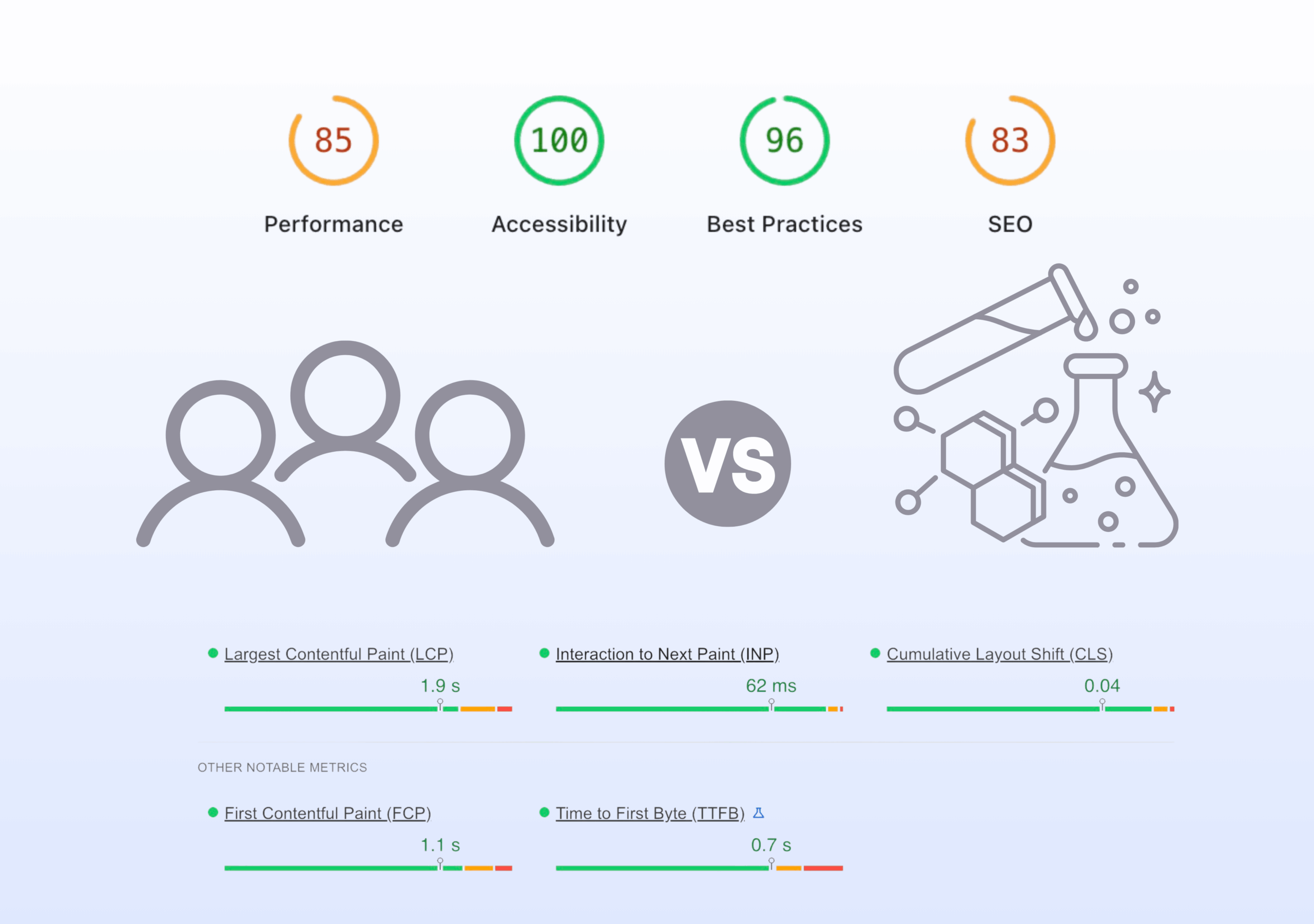
INP can be measured in two ways: field data and lab data.
Field data comes from real users visiting your store on real devices, networks, and browsers. This is the most accurate picture of actual user experience.
Both matter, but they answer different questions. Field data tells you whether users are actually having a problem. Lab data helps you figure out why.
If your scores do not match across tools, that is normal. Real users are browsing on slower phones, weaker CPUs, and inconsistent network connections. A controlled test cannot fully replicate that mess.
| Type | What It Is | Strength | Limitation | Best Use |
| Field Data | Data from real users on real devices, networks, and browsers | Most accurate reflection of real user experience | Harder to debug and control | Identify if users actually have a problem |
| Lab Data | Data from simulated tests in a controlled environment | Reproducible and easier to analyze | Does not fully reflect real-world conditions | Diagnose and fix performance issues |
Tools for Measuring INP
PageSpeed Insights is the best place to start because it shows both field and lab data in one report. The field data section shows real-world INP based on Chrome user data from the last 28 days.
Chrome DevTools is where you debug. In the Performance panel, you can record interactions, spot long tasks on the main thread, and see which JavaScript is causing delays.
Shopify’s performance dashboard gives you a high-level view of Core Web Vitals trends inside the admin.
Google Search Console shows which groups of URLs have poor Core Web Vitals scores and helps you prioritize what to fix first.
Step-by-Step INP Diagnosis Workflow
Start with PageSpeed Insights and test your most important templates: homepage, collection pages, and product pages.
Check the field data first. If INP is in the yellow or red range, real users are feeling the problem.
Then open Chrome DevTools, go to the Performance panel, and record the interactions that matter most on your store. Click add to cart, change a product variant, open the cart drawer, apply a filter.
After recording, look for long tasks on the main thread. These are the moments when the browser was too busy to respond quickly.
From there, expand the task and inspect the call stack. This helps you trace the delay back to the exact source, whether it is theme code, an app script, or custom JavaScript. That is the real fix target, not the vague idea of “improving speed.”
Why INP Scores Vary Across Tools
Different tools test under different conditions.
- Chrome DevTools lets you choose your own test conditions.
- Field data reflects the actual mix of devices your visitors use, which for many Shopify stores means mobile devices with lower processing power.
That is why you should use field data to judge impact and lab tools to debug fixes.
One tells you whether there is a problem. The other tells you what to break apart and fix, which is annoying but useful.
4 Proven Fixes to Improve Shopify INP
Improving INP comes down to reducing the amount of work blocking the browser during user interactions. These are the fixes that consistently have the biggest impact on Shopify stores.

Fix 1 — Eliminate or Defer Third-Party Scripts
Start with your apps. Every app adds JavaScript, and most of it runs on the main thread.
Audit each one. If it does not directly support conversions, remove it.
For the rest, delay execution. Review widgets, chat tools, and analytics do not need to load at page start. Defer them until after the page is interactive or trigger them based on user actions like scroll or hover.
Use defer, async, or conditional loading through a tag manager or theme settings.
Less JavaScript at load means faster response when users interact.
Fix 2 — Optimize Event Handlers
Every interaction runs an event handler. If it does too much work upfront, the browser blocks and users see nothing.
Keep the initial response lightweight. Show immediate feedback first, then run heavier logic.
For example, on add to cart:
- Update the button state or show a loader immediately
- Run API calls and updates after
Use async patterns to move work out of the critical path.
Common issues to fix:
- Scroll listeners running expensive logic on every scroll
- Synchronous product variant updates that block rendering
- No visible feedback within the first 200ms
Fix 3 — Break Up Long JavaScript Tasks
Any task over 50ms blocks the main thread.
Instead of running large chunks of JavaScript at once, split them into smaller tasks so the browser can respond between them.
Use:
- scheduler.yield() to pause and resume work
- navigator.scheduling.isInputPending() to detect pending interactions
For non-Chrome browsers, use fallbacks like setTimeout or MessageChannel.
This does not reduce total work, but it reduces how long users wait for a response.
Fix 4 — Reduce DOM Size in Interactive Areas
Large DOMs slow down every interaction. More elements mean more layout and rendering work.
Focus on high-interaction areas:
- Cart drawers
- Product grids
- Filter systems
Remove unnecessary elements and avoid rendering everything upfront.
High-impact improvements:
- Reduce products per page or use virtualization on collection pages
- Render only the selected product variant state
- Load filter options on demand instead of all at once
Advanced Optimization Techniques
Minimize main thread work
Move heavy logic off the main thread using Web Workers where possible. Audit unnecessary event listeners and unused scripts.
Lazy load and prioritize scripts
Load JavaScript only where needed. Split large bundles and defer non-critical code until after initial interaction.
Preload critical resources
Use <link rel=”preload”> for key assets like fonts or core scripts. This reduces delays when users interact early.
Why “One Fix” Doesn’t Work
There is no single fix for INP.
Your score depends on your theme, apps, custom code, and page structure. A fix that improves one page may not affect another.
The process is simple:
- Measure
- Fix
- Test
- Repeat
The goal is not a perfect lab score. It is consistent improvement in real user data.
Testing and Validation Checklist
After making changes, you need to validate them under realistic conditions. A faster lab score means nothing if real users still experience lag.

Shopify INP Optimization Testing Checklist
After making changes, test the exact interactions you optimized. Not the homepage hero image. The actual things users click.
Focus on real interactions:
- Click add to cart and check how fast visual feedback appears
- Apply filters on collection pages and observe response time
- Switch product variants on complex products and watch for lag
Use Chrome DevTools Performance panel and simulate real conditions:
- Apply CPU throttling at 4x or 6x
- Record interactions and look for long tasks on the main thread
Validate improvements in PageSpeed Insights using lab data first.
Then wait for field data to update. It uses a 28-day rolling window, so you will not see instant results.
Compare both:
- If lab data improves and field data improves, good
- If lab data improves but field data does not, you fixed the test, not the experience
Connecting INP to Business Outcomes
Faster interactions lead to higher conversion rates. This is consistent across studies and real-world data.
Every improvement in response time reduces friction. When users click add to cart, they expect immediate feedback. If nothing happens, they click again, create duplicate actions, or assume something broke and leave.
A cart drawer that opens in under 100ms feels smooth and reliable. One that takes 500ms or more feels slow, even if everything else on the page looks good.
INP is about removing these small delays. Each delay seems minor on its own, but across a session they add up. Fixing INP reduces those micro-frustrations and makes the buying process feel seamless.
If you’re looking at conversion rate more broadly, speed is just one piece of the puzzle. There are other common issues that quietly hurt performance even when your site feels fast. Here’s 6 Red Flags That Hurt Your Conversion Optimization
INP and SEO Rankings
INP will not carry your rankings on its own, but it gives you an advantage when competing pages are similar in content and authority.
In competitive niches, that difference matters.
Long term, this is not just about improving rankings. It is about keeping up. Google continues to put more weight on real user experience signals, and slow, unresponsive sites will fall behind.
So improving INP is not just optimization. It is maintenance.
Ignore it, and your competitors who did not ignore it will pass you. Which, given how competitive ecommerce is, will happen faster than you think.
Speed is a Process, Not a One-Off
Performance slips faster than you think.
Every new app, theme update, or feature can increase JavaScript, block the main thread, and hurt responsiveness. One bad install can undo months of work.
Build a simple routine:
- Run PageSpeed Insights after every app install
- Recheck INP after theme updates
- Review field data trends on a regular schedule
Set a quarterly audit. Look at which pages have degraded, identify the cause, and fix it before it spreads.
If you are not monitoring performance, it is getting worse. Quietly.
Building a Performance-First Shopify Store
This is a mindset shift.
Performance is not something you “finish.” It is a constraint you design within.
When evaluating changes:
- Ask what an app costs in JavaScript, not just what it does
- Consider how many DOM elements a new section adds
- Choose features that keep the main thread lighter
Interactivity should be part of the decision process, not something you fix later.
Stores that treat performance as a priority stay fast. Stores that treat it as an afterthought slowly turn into laggy, over-engineered messes.
You can probably guess which group most Shopify stores fall into. Don’t join them.
Fix Your INP Without Doing All This Manually
You can work through these optimizations manually and improve your Shopify store over time.
Or you can use a tool that helps handle a large part of it.
Hyperspeed is designed to improve Shopify performance by reducing JavaScript, deferring non-critical scripts, and optimizing how your store responds to user interaction.
It addresses common causes of poor INP, including third-party app bloat, render blocking scripts, and heavy main thread usage.
If you’re already working on performance, it can streamline the process and make improvements more consistent over time.
Compare how fast your store is to a huge sample of other stores. Get benchmarked and find out where you can improve your speed to make more sales. How fast is your Shopify store?
FAQ
What is INP (Interaction to Next Paint)?
INP (Interaction to Next Paint) is a Core Web Vital that measures how long it takes for a Shopify store to respond to a user interaction and update the screen. It captures input delay, processing time, and presentation delay, reflecting real responsiveness and interactivity.
Why is INP important for a Shopify store?
INP directly affects responsiveness and user interaction quality. Slow responses during add to cart, product variant selection, or filter button clicks create friction, reducing conversion rate and hurting SEO rankings as part of Core Web Vitals.
What is a good INP score?
A good INP score is 200ms or less. Scores between 200ms and 500ms need improvement, while anything above 500ms is poor. Shopify stores often struggle due to heavy JavaScript, main thread blocking, and third-party apps impacting responsiveness.
How is INP different from first input delay?
First input delay only measures the delay before the first interaction starts. INP measures the full interaction lifecycle across a session, including input delay, processing time, and browser paint, giving a more accurate view of real interactivity.
What causes poor INP on Shopify stores?
Poor INP is usually caused by JavaScript blocking the main thread. Common issues include third-party apps, render blocking scripts, slow event handlers, large DOM structures, and complex interactions like cart drawer updates or product variant logic.
How can I measure INP on my Shopify store?
Use PageSpeed Insights to view field and lab INP data. Then use Chrome DevTools to debug interactions and find long tasks on the main thread. Shopify’s performance dashboard and Core Web Vitals reports help track real-world trends over time.
How do third-party apps affect INP?
Third-party apps add JavaScript that runs on your Shopify store, often without optimization. This increases main thread work, delays user interaction responses, and raises INP, especially during critical actions like add to cart or opening a cart drawer.
What role does JavaScript play in INP?
JavaScript controls event handlers and UI updates. Heavy or synchronous JavaScript increases processing time and input delay, blocking the main thread. Optimizing JavaScript and reducing unnecessary execution improves responsiveness and lowers INP.
Does INP affect SEO rankings?
Yes, INP is part of Core Web Vitals, which influence SEO rankings. While not the only factor, poor INP can limit how well your Shopify store ranks compared to competitors with better page speed and stronger user experience signals.
How can I improve INP on mobile devices?
Focus on reducing JavaScript, deferring third-party apps, and optimizing event handlers. Use lazy loading and minimize DOM size to improve browser paint speed. Testing on mobile devices is critical since they have slower CPUs and higher input delay.