Winston Wu

We audited 1,166 Shopify stores and found the average PageSpeed score is just 30. This data-driven analysis reveals how apps, scripts, images, and CSS impact performance and what to fix first to improve Core Web Vitals and conversions.
Key Takeaways
→ The problem isn’t Shopify. It’s the browser workload. Fast servers don’t matter when JavaScript, apps, and assets block rendering for seconds.
→ Third-party scripts and apps dominate performance cost. More than half of scripts come from external services, often loading entire dependency chains.
→ High-impact fixes are simple and underused. Preloading LCP images, deferring CSS and scripts, and optimizing images can dramatically improve speed with minimal effort.
Why the Average PageSpeed Score Is So Low on Shopify Stores
We expected Shopify stores to be fast.

Shopify runs one of the most sophisticated commerce CDNs in the world. In our dataset, their edge network delivered first-byte response times as low as ~53 milliseconds when content was served from cache. They ship modern themes built on web components and invest heavily in platform-level performance.
So when we pointed 1,166 headless browsers at live Shopify stores and ran Google Lighthouse on each one, we expected the scores to reflect that investment.
They did not. The average PageSpeed score across our dataset was 30 out of 100.
While Lighthouse and PageSpeed scores are imperfect measures of performance, they reflect Core Web Vitals – the metrics that trigger warnings in Google Search Console and correlate with measurable drops in conversion rates.
This is what we found when we went looking for why.
So we looked at everything
We didn’t just run Lighthouse. To understand what was actually slowing these stores down, we instrumented each homepage and analyzed performance at the script level.

- Using Long Animation Frames API, we measured how much each script contributed to main-thread blocking time.
- We intercepted every network request via Chrome DevTools Protocol.
- We inspected the DOM for image attributes, CSS loading patterns, font delivery, and resource hints.
- We downloaded every script file for analysis.
Then we ran Lighthouse separately on each store for standardized scoring. 1,086 of the 1,166 stores returned successful audits.
The dataset we ended up with: 39,503 unique scripts. 147,725 total script instances. Full resource analysis across over a thousand live storefronts.
The server is fast. The browser is not.
The first thing we noticed was the contrast.
- Time to First Byte: 53 ms. That’s excellent. Shopify’s CDN and edge rendering are performing as expected.
- Largest Contentful Paint: 11,896 ms. Nearly 12 seconds for the most important visual element to appear on screen.
- Total Blocking Time: 8,801 ms. Almost 9 seconds where the main thread is occupied executing JavaScript, preventing the page from responding to user input.
The server delivers the first byte in 53 milliseconds. The browser then spends the next 12 seconds just trying to paint the hero image.
That gap is driven by what runs in the browser: JavaScript, images, CSS, and fonts.
This is not a hosting problem. It’s a front-end problem, largely shaped by what is added on top of the platform.
40,000 scripts, and we read every one
We expected a few thousand unique scripts across the dataset. We found 39,503.
The typical Shopify store loads more than 120 individual script resources during a single homepage visit. These contribute to 323 HTTP requests and 6.0 MB of page weight based on Resource Timing.
Measured through Lighthouse, total page weight increases to 11.0 MB as it includes resources loaded after the initial waterfall, such as dynamically injected scripts and deferred third-party payloads.
Nearly 45% of all HTTP requests go to third-party origins: domains the merchant does not control, cannot optimize, and often isn’t aware are being loaded.
We categorized every script by origin. The breakdown itself was not surprising, but the proportions were:
|
Category |
Unique Scripts |
| Third-party services (chat, reviews, upsell, A/B testing, payments) | 17,200 |
| Shopify platform (checkout, Trekkie analytics, storefront framework, Shop Pay) | 11,300 |
| Theme code (vendor libraries, custom JavaScript) | 4,100 |
| Tracking and analytics (Facebook, Google, Klaviyo, TikTok, Bing, Pinterest) | 3,400 |
| Installed Shopify apps (Theme App Extensions) | 2,400 |
More than half of all unique scripts originate from third-party services and trackers. The code defined by the theme, the part the merchant directly controls, represents a minority of what actually runs in the browser.
The usual suspects
Every store we looked at had some combination of these five scripts:
|
Script |
Stores | Blocking Time |
Size |
| Google Analytics (gtag.js) | 88% | 22 ms | 18 KB |
| Facebook Pixel (fbevents.js) | 77% | 18 ms | 65 KB |
| Google Tag Manager (gtm.js) | 57% | 33 ms | 22 KB |
| Microsoft Clarity | 42% | 95 ms | ~80 KB |
| Klaviyo | 38% | 32 ms | < 1 KB |
Each script adds between 18 and 95 ms of main-thread blocking time. Individually, that may seem minor. In practice, most stores run three to five of these simultaneously.
A typical setup with Google Analytics, Facebook Pixel, Google Tag Manager, and Microsoft Clarity can contribute around 168 ms of blocking time from tracking scripts alone before any product images or core content are rendered.
Google Tag Manager is worth calling out separately. It’s not just a script, but a loader for additional scripts. In our dataset, stores using GTM as a primary container loaded an average of three additional scripts, contributing roughly 195 ms of combined execution time.
The overhead doesn’t come from the container itself (~33 ms), but from the cumulative impact of the tags configured within it.
Then we found the apps
Analytics scripts were expected. What stood out was the impact a single Shopify app could have on main-thread performance.
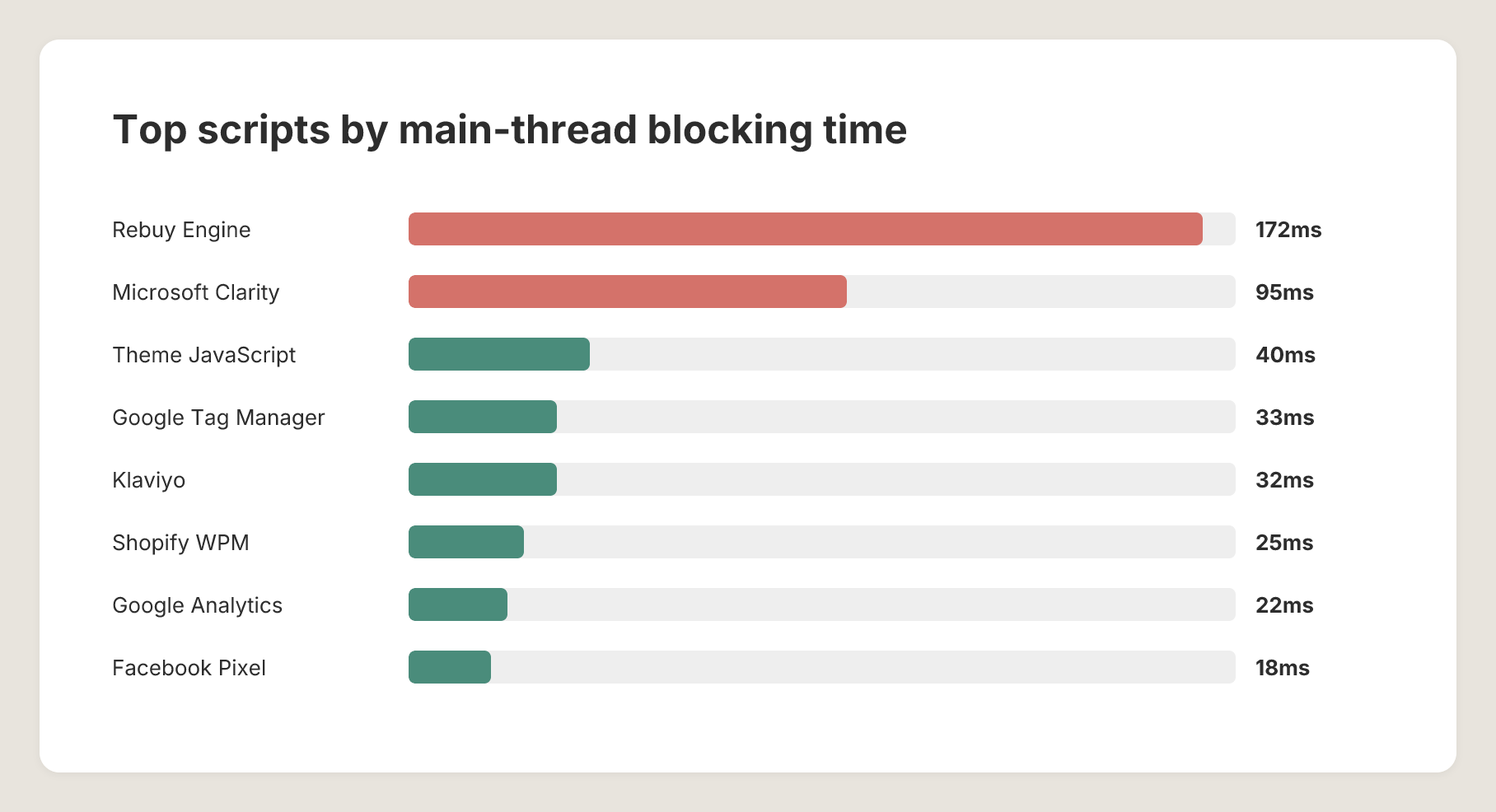
Rebuy Engine, an upselling tool on about 9% of stores, blocks the main thread for 172 ms on average. That’s nearly 10x Google Analytics. It loads 7 child scripts including jQuery (in 2026!!), a carousel library called Flickity, and multiple widget templates. One upsell app costs more main-thread time than every analytics script combined.
Microsoft Clarity is present on 42% of stores with 95 ms of blocking. Unlike other analytics scripts that fire beacons and move on, Clarity is a full session recording tool. It attaches a MutationObserver to every DOM node. It records mouse movements, clicks, scroll positions, and viewport changes. It has to observe the page, not just report on it, and that’s fundamentally more expensive.
Gorgias Chat appears on about 10% of stores. When loaded, it is a full React application bundled with Redux, a state management library, and real-time messaging infrastructure. It totals over 600 KB across 11 child scripts and 2.2 seconds of execution time. The chat bubble in the bottom-right corner of the page costs more than the entire theme.
1 tag, 23 scripts
We built a dependency graph for every script in the dataset by tracing initiator chains through the Long Animation Frames API and Resource Timing data. The results were revealing.
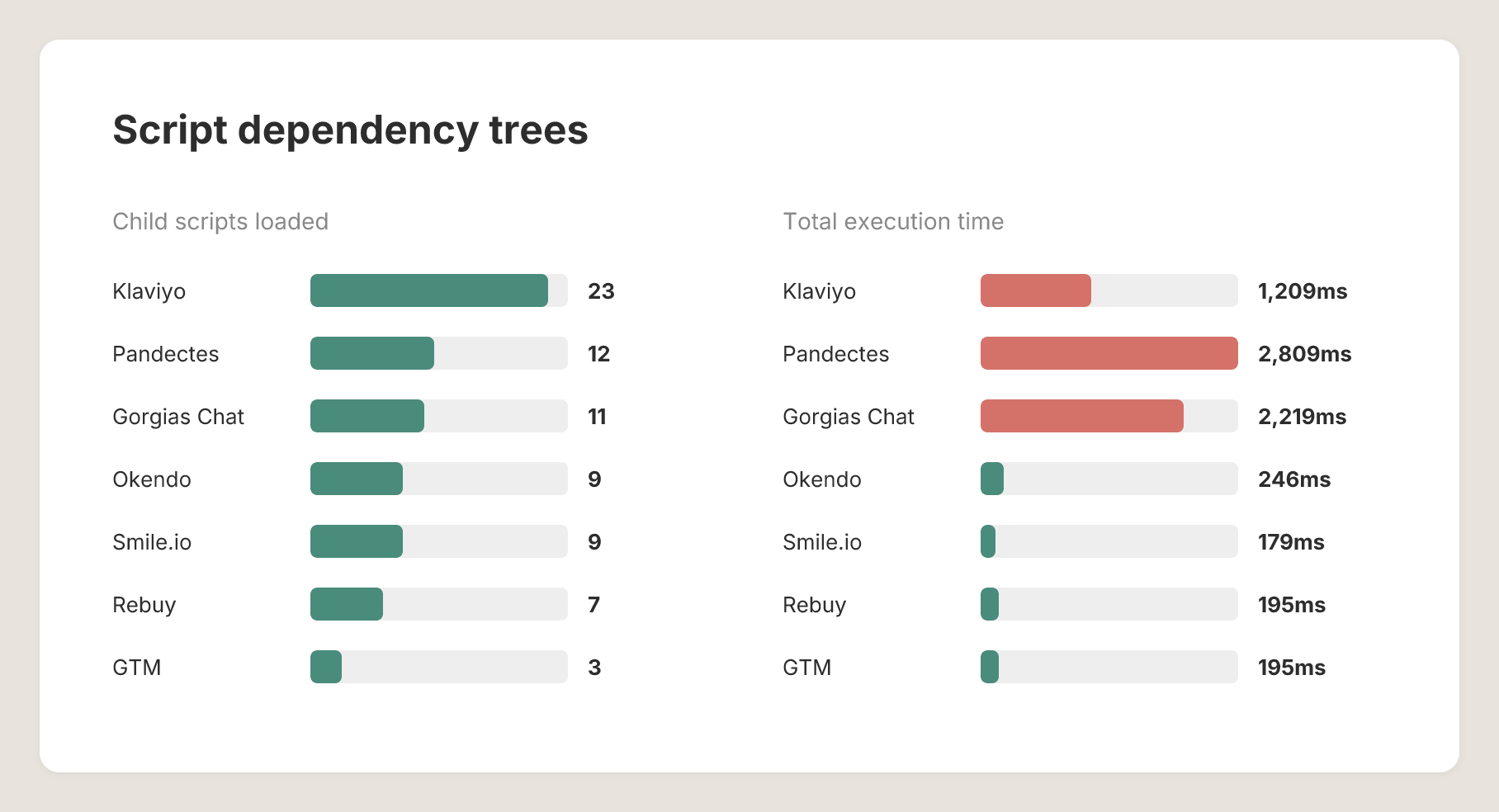
Some scripts don’t just execute. They load other scripts, which load more scripts. These dependency chains compound performance costs in ways that are invisible in a standard network waterfall or Lighthouse audit. You see one script tag. The browser sees a tree.
| Root Script | Avg Child Scripts | Avg Total Duration |
| Pandectes cookie consent | 12 | 2,809 ms |
| Klaviyo loader | 23 | 1,209 ms |
| Gorgias chat | 11 | 2,219 ms |
| Google Tag Manager | 3 | 195 ms |
| Rebuy Engine | 7 | 195 ms |
| Okendo reviews | 9 | 246 ms |
| Smile.io loyalty | 9 | 179 ms |
Pandectes, a cookie consent manager, tops the list. In our dataset, it loads 12 child scripts with a combined 2.8 seconds of execution time for a compliance banner.
Klaviyo’s main loader spawns an average of 23 child scripts, contributing around 1.2 seconds of combined execution. This is the cost of a single “install our snippet” integration.
These loaders are largely invisible to merchants. You install one app in the Shopify admin and see a single script tag. Behind that tag, however, is a cascade of downstream JavaScript that loads on every page view, whether or not the customer ever interacts with the feature.
The image nobody preloaded
Of the 1,166 stores in our dataset, 753 have an image as their Largest Contentful Paint element; typically a hero banner or the product image. In most cases, this is the first meaningful visual a customer sees.
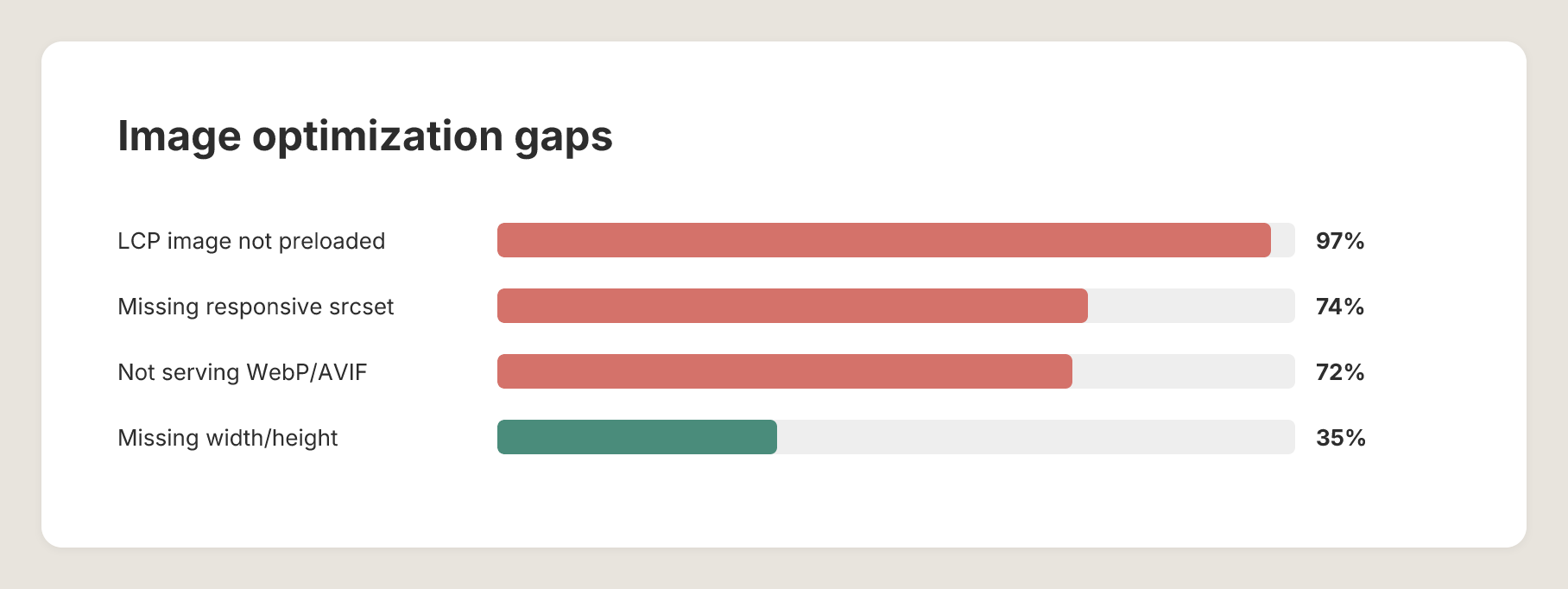
Of those 753 stores, 729 do not preload it. That is 97%.
Adding a preload tag for the LCP image is a single line of HTML. It tells the browser to fetch the image immediately instead of waiting to discover it during page parsing. It has zero risk of breakage and can reduce LCP by hundreds of milliseconds.
Yet 97% of stores leave this optimization unused.
The broader image picture shows similar patterns. The average store loads 123 images totaling 3.2 MB, more than half the total page weight.
- 72% of stores serve images larger than 10 KB in JPEG or PNG instead of WebP or AVIF.
- 74% lack responsive srcset attributes.
On average, Lighthouse identifies 559 KB of offscreen image savings per store on average: images loaded eagerly that aren’t visible in the initial viewport.
CSS follows the same pattern. The average store loads 26 stylesheets, nearly all of them render-blocking. Only 10 out of 1,166 stores defer non-critical CSS. Lighthouse reports an average of 676 ms of render-blocking time from CSS alone.
What we’d fix first
If we were optimizing a single Shopify store, this is the order we’d follow:
- Preload the LCP image. This is a single line of HTML tag and has zero risk. It’s the highest-ROI performance intervention available on Shopify today.
- Defer non-critical CSS. The average store loads 26 render-blocking stylesheets, contributing around 676 ms of blocking time, with less than 1% adoption. Extract the critical CSS needed for the initial viewport and defer everything else.
- Defer app widgets until interaction. Many app widgets load immediately, regardless of user intent. Gorgias loads 2.2 seconds of JS for a chat widget most people ignore. Rebuy adds around 172 ms for upsell suggestions. Replace this with lightweight placeholders and load the real widget only on interaction. With average TBT reaching 8.8 seconds, this is the fastest way to reduce it.
- Serve images in modern formats with responsive sizing. 72% of stores still serve legacy formats like JPG and PNG, and 74% lack “srcset”. Switching to WebP or AVIF and implementing responsive image can deliver around 1 MB of savings per store.
- Defer tracking scripts. Facebook Pixel, Google Analytics, and Clarity all support deferred init through queue-based architectures and sendBeacon. Deferring them doesn’t result in data loss, it simply delays when they begin processing.
How we measured this test (Methodology)
We analyzed 1,166 Shopify stores selected from a dataset of 5,444 active merchants, sampled by estimated monthly traffic volume.

Phase 1: Runtime analysis
Each store’s homepage loaded in a headless Chromium browser via Kernel cloud infrastructure. Pages were fully executed with JavaScript enabled, network idle detection, and no ad blockers.
We collected performance data using the Long Animation Frames (LoAF), Performance Observer, Resource Timing API, Chrome DevTools Protocol, and DOM inspection. This allowed us to measure script execution, main thread blocking time
Phase 2: Lighthouse audits
Each store was audited independently using Google Lighthouse v12. Of the 1,166 stores, 1,086 returned successful audits.
From these, we collected Core Web Vitals and performance metrics including LCP, CLS, TBT, FCP, Speed Index, TTI, TTFB, along with Lighthouse diagnostic data.
Script analysis
Scripts were categorized by origin and evaluated on transfer size, main-thread blocking time, render-blocking behavior, third-party impact, and cross-store prevalence.
Dependency trees were reconstructed from LoAF and Resource Timing data, allowing us to map how scripts load and trigger additional resources.
In total, we identified 39,503 unique script files across 87,000+ cached resources.
All data was collected in April 2026.
Your store isn’t slow. Your stack is.
We run this exact analysis on every store we optimize at Hyperspeed.
Then we fix what matters, reducing main-thread blocking, deferring non-critical scripts, and optimizing how your storefront loads and renders.
No guesswork. No manual cleanup.
Try Hyperspeed free for 7 days
How fast is your Shopify store?
Compare how fast your store is to a huge sample of other stores. Get benchmarked and find out where you can improve your speed to make more sales.
FAQ
Why is my Shopify store slow even with good hosting?
Shopify performance issues are rarely server-related. Most slow stores suffer from heavy JavaScript, third party scripts, and poor shopify apps performance, which increase main thread blocking time. This directly hurts core web vitals like LCP and TBT, reducing shopify speed and user experience.
How can I improve my average PageSpeed score on Shopify?
To improve your average PageSpeed score, focus on shopify optimization basics: preload the largest contentful paint (LCP) image, defer non-critical CSS, and reduce total blocking time shopify by limiting third party scripts. These changes significantly improve core web vitals and shopify site speed.
What causes high Total Blocking Time (TBT) on Shopify stores?
High total blocking time (TBT) is usually caused by shopify apps performance and third party scripts executing on page load. These increase main thread blocking time and delay interactivity. Shopify defer javascript apps and reducing script load is key to shopify main thread blocking time optimization.
How do third-party scripts affect Shopify site speed?
Shopify third party scripts slowing site performance are a major issue. Scripts like analytics, chat, and tracking tools load additional dependencies through shopify dependency tree scripts, increasing HTTP requests and execution time. This impacts pagespeed score and core web vitals across all pages.
What is the fastest way to fix a slow Shopify store?
The fastest shopify slow loading site fix is reducing script load and prioritizing critical content. Use shopify lcp image preload optimization, shopify render blocking css fix, and shopify image optimization webp avif. These changes improve shopify page load speed optimization and boost average pagespeed score quickly.