Alexander Lam

Does a Shopify page builder really hurt store speed and conversion? Our analysis of 1,237 Shopify stores found heavier JavaScript and more requests, but builder use alone didn’t predict Core Web Vitals performance. See what actually separated passing and failing stores.
Key Takeaways
→ Page builder stores were heavier, but not necessarily slower. Stores using a detected builder carried 20% more JavaScript and fired 11% more network requests, yet their product pages passed Core Web Vitals more often: 68.3% vs. 63.3%.
→ Page weight separated passing and failing builder stores more clearly. Failing stores carried 14% more JavaScript, 18% more requests, and 21% more total page weight. Their real-user LCP was 3.0 seconds compared with 1.6 seconds for passing stores.
→ App count alone didn’t explain the gap. Passing and failing builder stores both had a median of eight apps. The findings point toward measuring the weight of the entire storefront stack instead of blaming or removing a Shopify page builder by default.
Is Your Shopify Page Builder Actually the Problem?
Your store looks better than it used to. Traffic is coming in. But conversion isn’t where you want it.

If you’re using a Shopify page builder, it’s an easy thing to suspect. PageFly, Shogun, GemPages, EComposer, and Replo all give merchants more control over how pages look and work. That functionality also has to load somewhere, usually through additional JavaScript, CSS, and network requests.
That matters because page speed has a business cost.
So we wanted to answer a more useful question than whether page builders add code. Do they add enough weight to meaningfully hurt Shopify website performance, and potentially the conversions those pages were built to improve?
We tested it across 1,237 live Shopify stores. The first round of data gave us exactly the answer we expected. The deeper analysis didn’t.
Slow Shopify Stores Pay a Conversion Price
Before blaming the builder, there’s a reason performance deserves scrutiny in the first place: shoppers respond to it.

Google and Deloitte’s Milliseconds Make Millions study analyzed more than 30 million mobile sessions across 37 brands. For retail sites, a 0.1-second improvement in mobile site speed was associated with an 8.4% increase in conversion rates and a 9.2% increase in average order value.
That doesn’t mean shaving 0.1 seconds from any Shopify store automatically produces an 8.4% conversion lift. Traffic, products, customers, and the rest of the buying experience still matter. What the research establishes is that relatively small changes in performance can have measurable commercial effects and that revenue loss compounds quietly as a store grows if nobody’s watching for it.
For store owners, that makes page speed more than a Lighthouse score. Every product page and landing page has two jobs: persuade someone to buy and deliver that experience without making them wait for it.
Why the Shopify Page Builder App Becomes a Suspect
This is where page builders create an interesting tradeoff.

Merchants use them for CRO in the first place. A drag and drop builder can create custom layouts, richer product pages, reusable sections, social proof, upsells, and other experiences that would take considerably more work in Shopify’s standard theme editor.
Those features can make a page better at selling. They can also make it heavier.
Every additional component has a performance cost somewhere, whether that’s JavaScript, CSS, network requests, or work the browser has to perform before the page becomes usable. The question is whether that cost is large enough to undermine some of the conversion value the builder was supposed to create.
That’s a plausible theory. But plausible isn’t the same as proven.
So instead of assuming page builders were the problem, we tested whether stores using them actually performed worse.
We Tested the Page Builder Theory Across 1,237 Shopify Stores
We built our dataset from 1,237 live Shopify stores, crawled through actual browser sessions and tested with Lighthouse.
- To identify builder stores, we matched verified script-URL signatures observed during each crawl rather than relying on vendor names or App Store listings.
- We removed false positives, including unrelated scripts with similar names and a checkout upsell tool that shares a company with a builder but doesn’t build pages.
Six builders appeared in the final dataset: PageFly, Shogun, Replo, EComposer, Zipify Pages, and GemPages.
In total, 209 of the 1,237 stores were running one of them.
We then compared JavaScript payload, total page weight, network requests, field LCP, and Core Web Vitals results between stores with and without a detected builder.
First Finding: Page Builder Stores Really Are Heavier
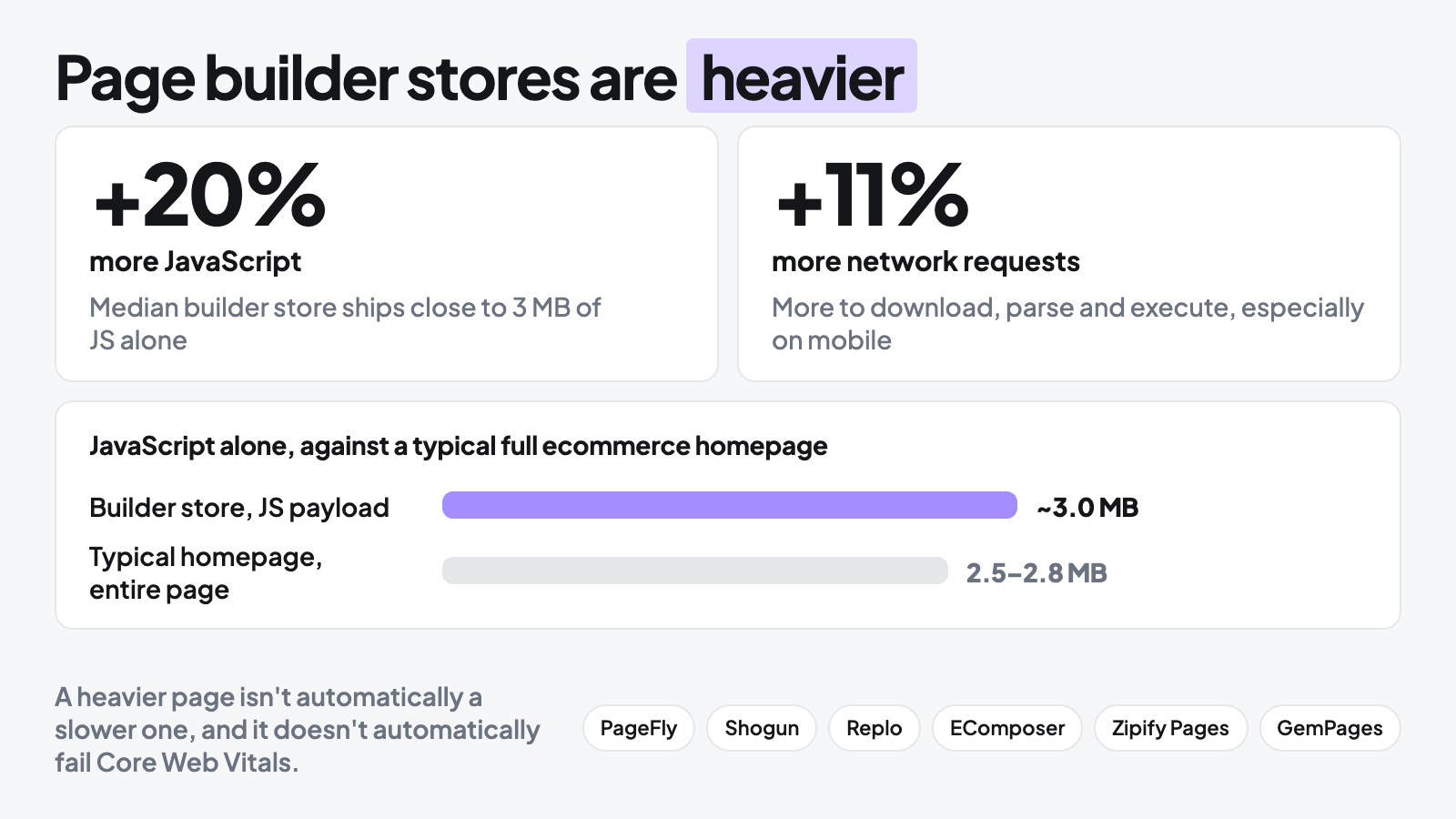
The first comparison supported the popular theory. Stores with a detected builder carried 20% more JavaScript and fired 11% more network requests than stores without one.
The difference was substantial. The median builder store shipped close to 3 MB of JavaScript before accounting for images, fonts, or other assets. For context, HTTP Archive’s Web Almanac puts the typical ecommerce homepage at roughly 2.5 to 2.8 MB for the entire page. In our sample, JavaScript alone was approaching that range.
More code gives the browser more to download, process, and execute, which can become particularly noticeable on mobile devices. But this is also where the distinction matters:
a heavier page isn’t automatically a slower one, and it doesn’t automatically fail Core Web Vitals.
If we’d stopped here, page builders would have looked like a fairly convincing culprit.
But product pages are where builders share the browser with galleries, reviews, purchase controls, and other storefront functionality.
If builders were meaningfully dragging down performance, that’s where we expected the effect to become clearer.
So we crawled 392 real product pages.
Then We Tested the Pages Where Builders Should Hurt Most
Our second crawl covered 392 real product pages. If builder weight were a reliable predictor of poor performance, this was where we expected the relationship to become clearer.
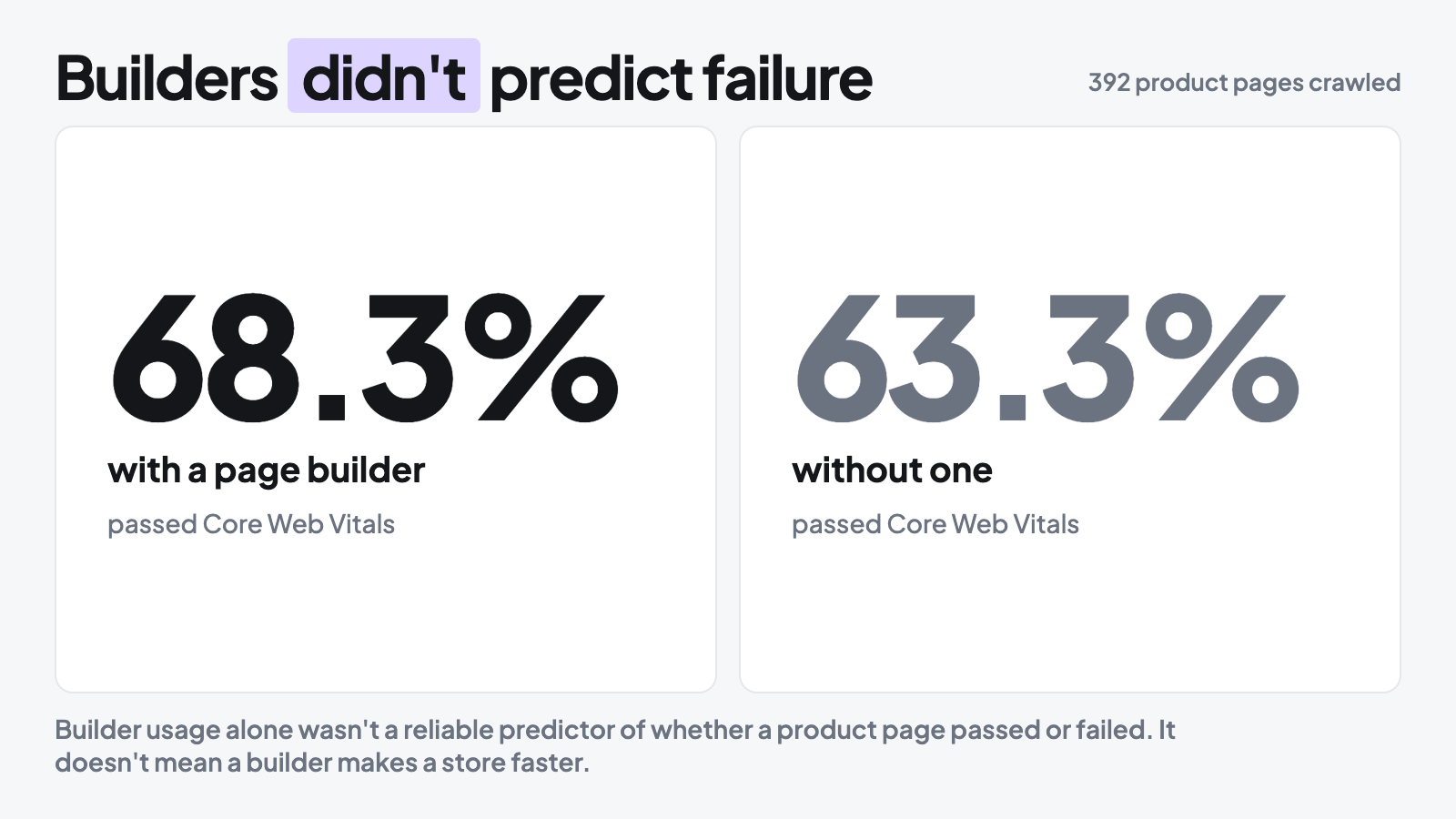
Instead, builder product pages passed Core Web Vitals 68.3% of the time, compared with 63.3% for product pages without a detected builder.
That doesn’t mean installing a builder makes a store faster. It means builder usage alone wasn’t a reliable predictor of whether a product page passed or failed Core Web Vitals. Despite carrying more JavaScript and firing more requests in our earlier comparison, builder stores weren’t consistently ending up on the wrong side of the performance threshold.
That changed the question. If using a builder didn’t reliably separate passing stores from failing ones, what did?
So Is Your Page Builder Hurting Conversion or Not?
Possibly, but our data suggests the builder itself isn’t enough to answer that question.
The performance cost is real. Builder stores in our sample carried more JavaScript and fired more network requests.
But merchants use these tools for a reason.
They make it easier to create richer layouts, test different experiences, add social proof, and build pages around how customers actually shop.
That creates a tradeoff.
A feature that adds weight may still earn its place if it improves the buying experience. The problem starts when the performance cost grows without adding equivalent value.
So the useful question isn’t simply whether your builder adds weight. It’s whether the experience it creates is worth that weight, and how well that weight is being managed.
Our next comparison gave us a much clearer answer to that second part.
What Actually Separates Fast and Slow Shopify Page Builder Stores?
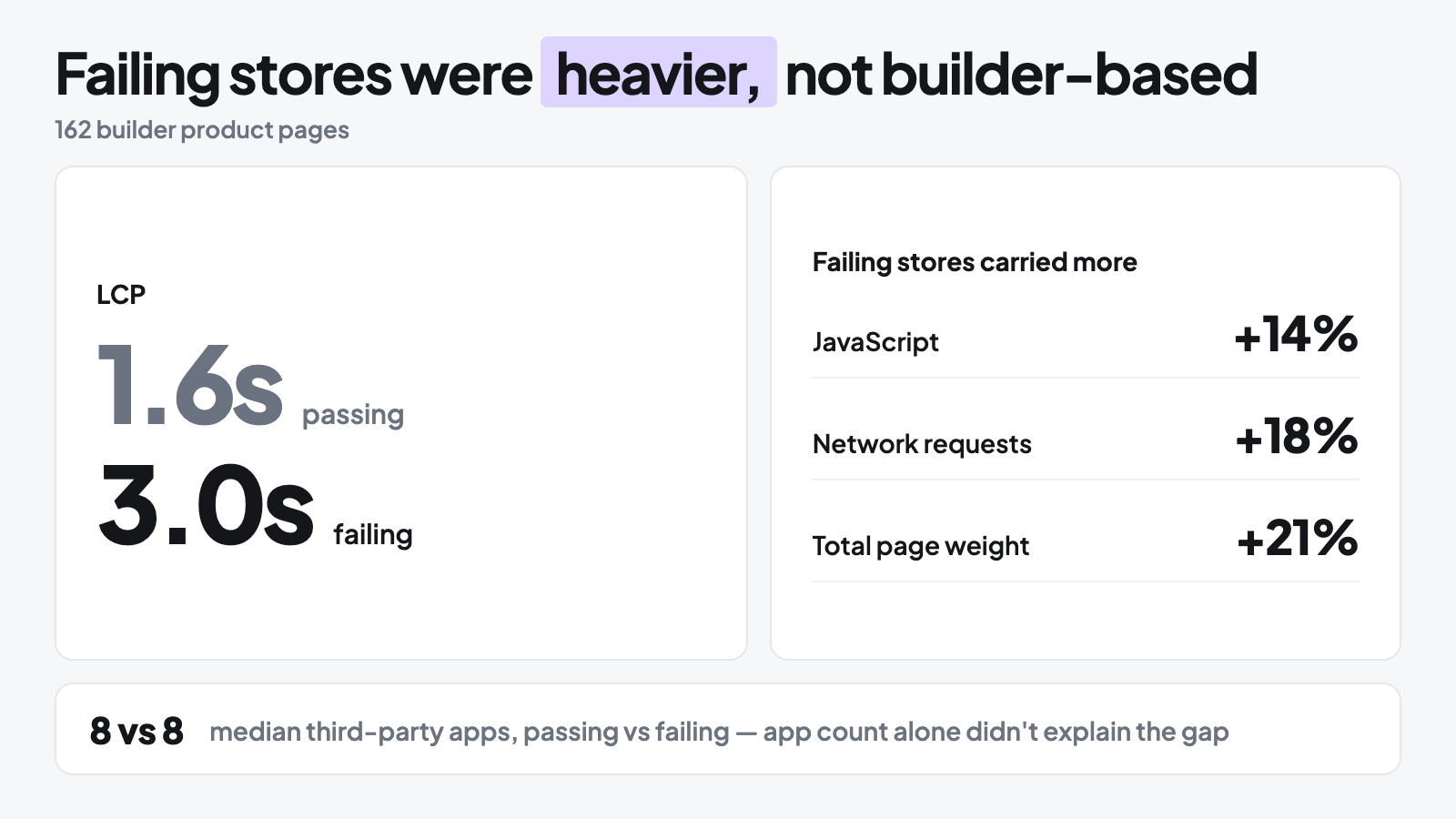
Once builder usage stopped explaining performance cleanly, we changed the comparison. Instead of builder versus non-builder stores, we looked only at the 162 builder-based product pages and split them by Core Web Vitals pass or fail.
Failing Builder Stores Were Heavier Across Every Metric
The pattern was much clearer. Failing stores carried 14% more JavaScript, fired 18% more network requests, and had 21% more total page weight.
The biggest difference showed up in LCP. Passing stores loaded in 1.6 seconds, while failing stores took 3.0 seconds.
Unlike the earlier builder comparison, every metric here moved in the same direction. The stores failing Core Web Vitals weren’t simply using a builder. They were carrying more weight while using one.
But Were They Just Running More Apps?
That left another possibility. Maybe failing stores simply had more third-party apps and tracking scripts adding to the load.
We counted them. The median was eight apps in the passing group and eight in the failing group. roughly in line with what we found when we looked at how many apps the average Shopify store runs.
App count alone couldn’t explain the performance gap. Stores running a similar number of tools were still ending up with very different payloads, requests, and real-user load times.
That points to a more useful distinction than how many tools a merchant uses: how much weight the storefront ultimately carries, and how that weight is managed.
The Builder Isn’t the Whole Stack
The eight-app finding matters because a storefront doesn’t run its builder in isolation. Apps, tracking, images, theme code, and custom functionality all contribute to what the browser ultimately has to load, the same story we’ve seen with review widgets that quietly cost more than they look like they should.
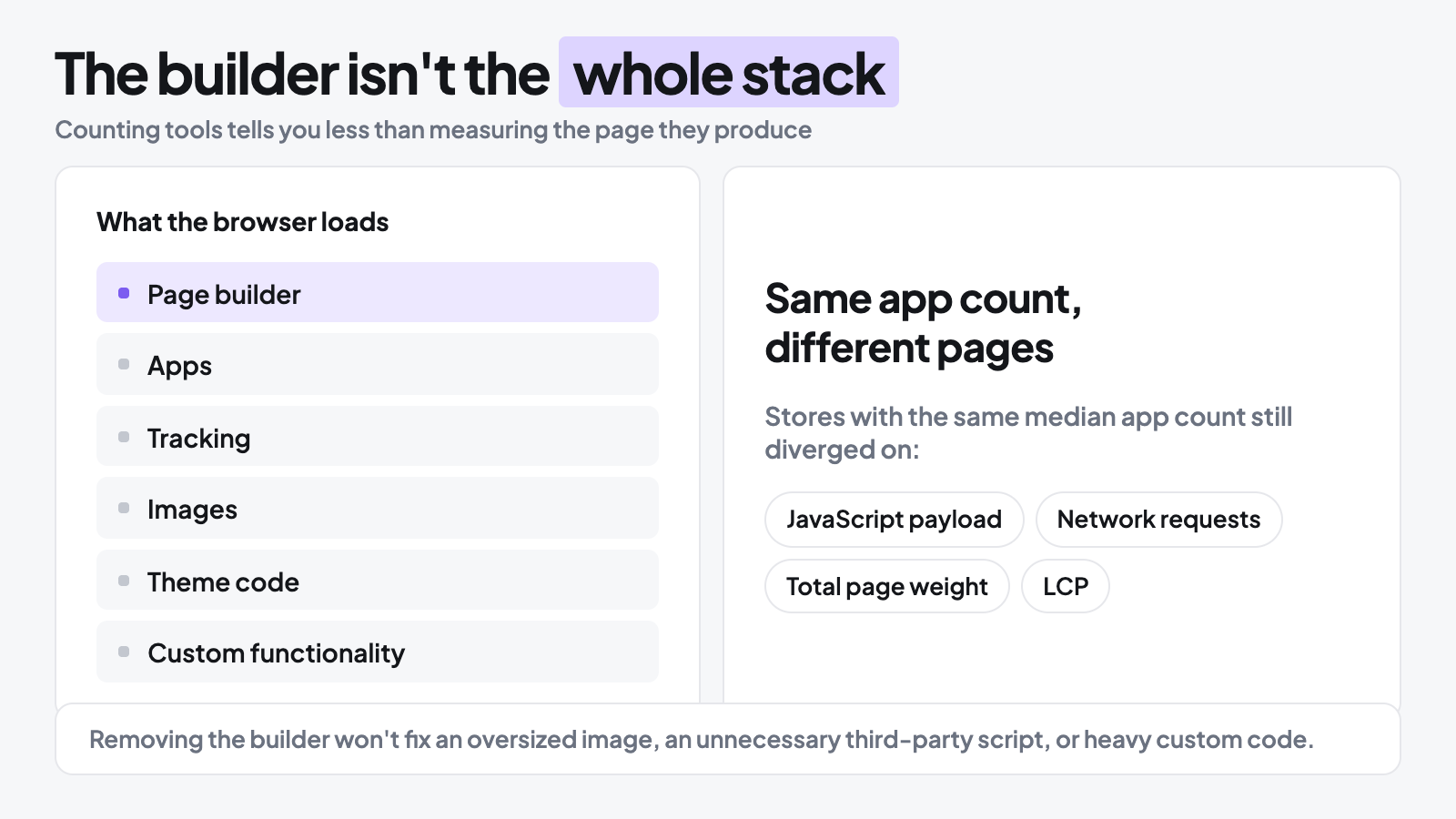
That means counting tools tells you less than measuring the page they produce.
Two stores can have the same median app count and still end up with very different JavaScript payloads, network requests, total page weight, and real-user LCP, exactly as we saw in our passing and failing groups.
For a merchant, that changes the diagnosis.
Removing the builder won’t fix an oversized image, an unnecessary third-party script, or heavy custom code. And for builder developers, optimizing the builder itself can only control one part of the storefront it eventually runs inside.
The builder can contribute to the weight. It just isn’t the whole stack.
Should You Remove Your Shopify Page Builder?
Not based on one bad speed test.
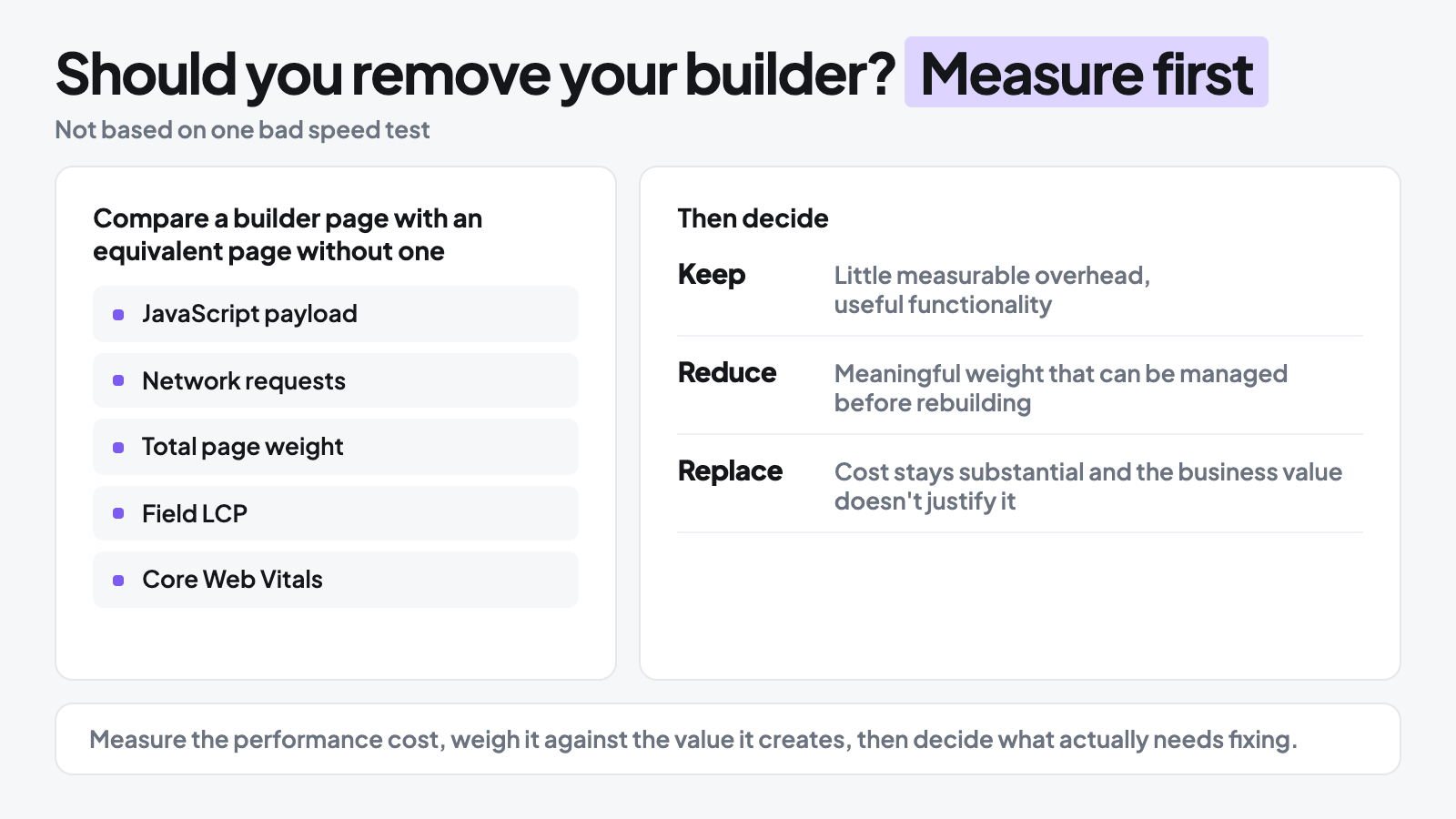
Removing a builder can mean rebuilding pages, losing functionality that contributes to the buying experience, and still leaving the actual performance problem untouched.
Our data gives merchants a better reason to measure first: builder usage alone didn’t reliably separate stores that passed Core Web Vitals from those that failed.
Measure What the Builder Is Actually Costing You
Where possible, compare a builder page with an equivalent page that doesn’t use the builder.
Look at JavaScript payload, network requests, total page weight, field LCP, and Core Web Vitals.
PageSpeed Insights can also show whether real-user data is available for the page or origin.
The goal isn’t to prove that the builder adds weight. We already know it can. The goal is to find out whether that cost is large enough to matter in your store.
Decide Whether the Cost Is Worth Keeping
If the builder adds little measurable overhead and provides useful functionality, there’s little reason to remove it. If it adds meaningful weight, find out whether that cost can be reduced before rebuilding anything. Replacement makes more sense when the performance cost remains substantial and the builder isn’t providing enough business value to justify it.
That’s a more useful decision than choosing a builder by reputation alone.
Measure the performance cost, weigh it against the value it creates, then decide what actually needs fixing.
Don’t Rebuild Your Store Before You Know What’s Slowing It Down
The difference between the passing and failing builder stores wasn’t small. Real-user LCP was 1.6 seconds for passing stores and 3.0 seconds for failing stores, a 1.4-second gap in the experience shoppers actually received.
So while our data doesn’t support blaming the page builder by default, it doesn’t make poor performance any less important to fix.
The goal is to preserve the parts of the storefront that contribute to the buying experience while reducing the performance cost around them. That starts with finding the actual bottlenecks rather than removing tools based on category alone.
Find the Weight Before Removing the Tools
A slow page can accumulate weight from its builder, apps, images, tracking scripts, theme code, custom functionality, or some combination of them. Our results showed why diagnosis matters: builder usage alone didn’t reliably predict Core Web Vitals performance, and passing and failing builder stores had the same median app count.
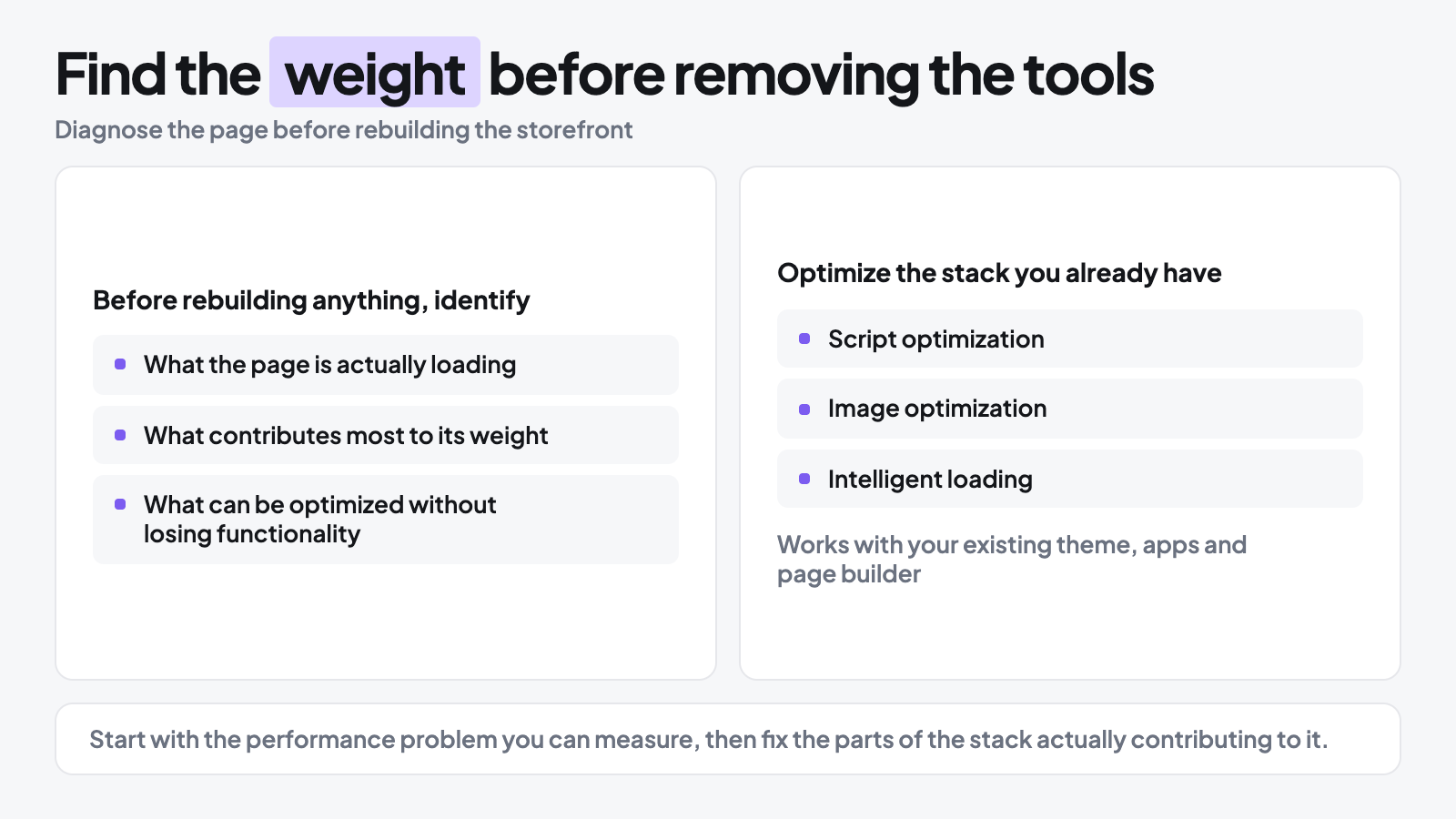
Before rebuilding anything, identify what the page is actually loading, what contributes most to its weight, and what can be optimized without sacrificing functionality that earns its place.
Optimize the Stack You Already Have With Hyperspeed
That’s where Hyperspeed comes in. It works with the Shopify setup you already have, including your theme, apps, and page builder, to reduce unnecessary performance overhead through features such as script optimization, image optimization, and intelligent loading.
For merchants, that means optimization doesn’t have to begin with rebuilding the storefront.
Start with the performance problem you can measure, then fix the parts of the stack actually contributing to it.
Compare how fast your store is to a huge sample of other stores. Get benchmarked and find out where you can improve your speed to make more sales. How fast is your Shopify store?
FAQ
Do Shopify page builders slow down your store?
Shopify page builders can add JavaScript, requests, and page weight, but our data found builder use alone didn’t predict Core Web Vitals failure. Measure your page builder’s actual impact on field LCP, total weight, and requests before removing it, then compare that cost with the conversion value it provides.
Can a Shopify page builder hurt conversion?
A Shopify page builder can affect conversion if its performance cost slows the buying experience, but builders also enable CRO (conversion rate optimization), richer product pages, and testing. Judge the tradeoff using field LCP and Core Web Vitals alongside conversion data rather than speed scores alone.
Should I remove PageFly, GemPages, EComposer, Shogun, or Replo to improve speed?
Before removing PageFly, GemPages, EComposer, Shogun, or Replo, compare a builder page with an equivalent Shopify theme editor page. Check JavaScript, network requests, total page weight, field LCP, and Core Web Vitals. If the overhead is small or fixable, rebuilding may create more work than value.
Do more Shopify apps make page builder stores slower?
App count alone doesn’t explain Shopify page speed. In our builder sample, passing and failing product pages both had a median of eight apps, while failing pages carried more JavaScript, requests, and total weight. Audit what each app, page builder, image, tracking script, and theme component actually loads.
How should I choose a Shopify page builder without hurting performance?
Choose a Shopify page builder by testing features you’ll actually use, not just templates, pricing, a free plan, or App Store rating. Build a representative product or landing page, then compare mobile Core Web Vitals, page weight, and requests. Keep it only if its CRO value justifies the performance cost.