Alexander Lam

How many Shopify apps does the average store run? We analyzed 400+ live stores and found Shopify apps slow down store performance significantly as app stacks grow. See which apps are most common, how they affect Core Web Vitals, and why frontend complexity impacts PageSpeed.
Key Takeaways
→ The average Shopify store runs nearly 6 detectable frontend apps, while heavily stacked stores run 10 to 25 simultaneously.
→ Shopify apps slow down store performance progressively, with stores running 16+ apps averaging a PageSpeed score 15 points lower than leaner stores.
→ Analytics, chat, upsell, and session-recording tools create the heaviest frontend load because they continuously execute JavaScript during page render and interaction.
We recently published a deep dive into what actually slows Shopify stores down. We instrumented 1,166 live storefronts, read every script, and traced every dependency chain.
The conclusion was clear: the server is fast. The browser is not.
And the gap between the two is almost entirely driven by what merchants install on top of the platform.
That raised a follow-up question we wanted to answer with data:
How many apps is the typical Shopify store actually running?
Not what merchants say they have. Not what app stores report as install counts. What is actually running on live storefronts, detectable from the outside, right now.
So we analyzed 400+ active Shopify stores, fingerprinting every app we could identify from each store’s public page source. Then we matched those app counts against Google PageSpeed scores to put a number on the cost.
Here is what we found.
Methodology
We compiled a list of active Shopify stores from multiple public web sources and verified each one was running on the Shopify platform before including it in the dataset. We only included stores with at least one detectable app, since the focus of this research is the app ecosystem and its impact on performance.

For each store, we analyzed the homepage, a collection page, and a product page. We scanned each page’s HTML and JavaScript for known fingerprints, such as CDN URLs, JavaScript globals, CSS class names, and DOM attributes that specific apps inject into the frontend.
Our fingerprint database covers more than 100 apps across 20 categories including email marketing, reviews, live chat, upsell tools, loyalty programs, analytics, subscriptions, and ad pixels.
After identifying apps, we ran each store through the Google PageSpeed Insights API using the mobile strategy, which reflects Core Web Vitals, the metrics that affect Google Search rankings and correlate with measurable changes in conversion rates.
One important caveat: our detection works from public page source only. Apps that operate purely in the backend, or that inject nothing into the frontend, will not appear in our data.
This means our app counts are a conservative undercount of true installs. The speed impact we found is likely understated as a result.
Finding 1: How Many Shopify Apps Does the Average Store Actually Run?
Across 400+ stores with at least one app installed, the average number of detectable apps was 5.94 — nearly 6.
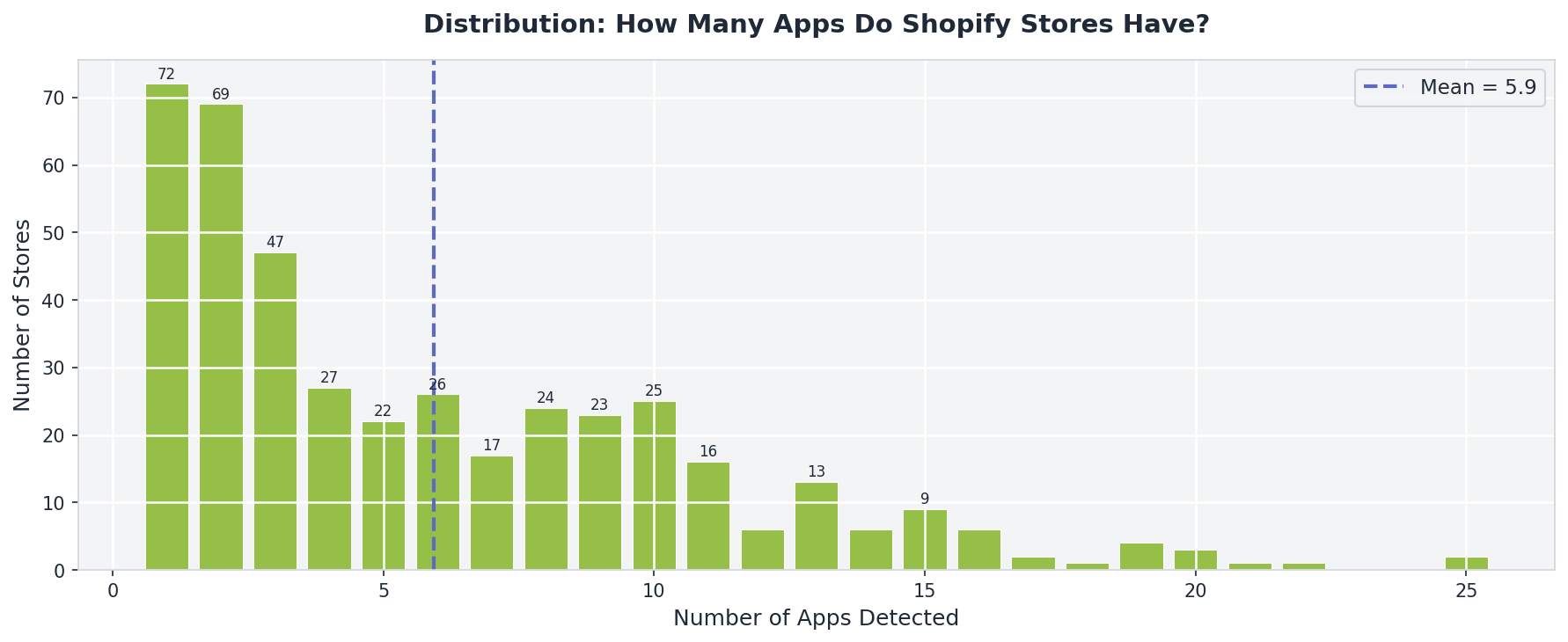
The median was 4, meaning half of all stores in our dataset ran 4 or fewer apps. The most common count was 1, reflecting a large group of stores running a minimal stack. But the distribution has a long tail: some stores ran 15, 19, even 25 detectable apps simultaneously.
Here is how the distribution breaks down:
- 25th percentile: 2 apps
- Median: 4 apps
- Average: 6 apps
- 75th percentile: 9 apps
- 90th percentile: 13 apps
- Maximum: 25 apps
The picture this paints is a market split in two. A large group of leaner stores running 1 to 4 apps, and a smaller but significant group of heavily stacked stores running 10 or more. The average of 6 sits in between, pulled upward by the high end.
If your store is running 9 or more apps, you are already in the top quarter of stack complexity in our dataset.
Finding 2: These Are the Most Installed Apps
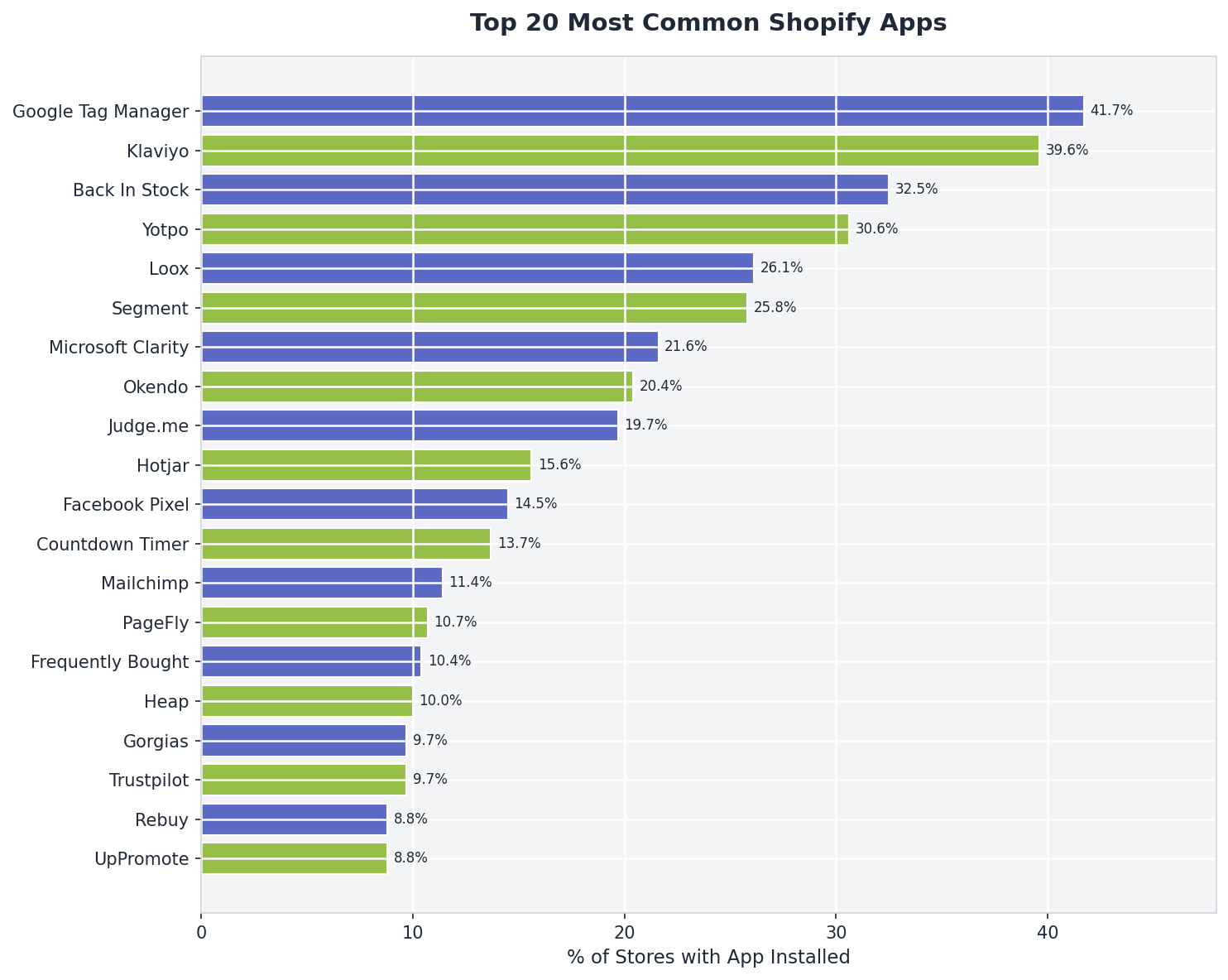
Out of 400+ stores, here are the apps we detected most frequently:
The Hidden Cost of Tag Managers and Marketing Loaders
A few things stand out immediately from the app distribution data.
Google Tag Manager tops the list at 41.7%, making it the single most common frontend technology we detected across the dataset. But understanding what that number actually represents is important, because GTM is rarely just one script.
Unlike a standalone app, GTM functions as a centralized loader for additional third-party systems. In our earlier research across 1,166 storefronts, we found that stores using GTM loaded an average of 3 additional scripts through the container itself, contributing roughly 195ms of combined execution time.
That creates a visibility problem.
Many merchants think they are running:
- one analytics tool
- one ad platform
- and one marketing pixel
In reality, GTM often becomes the delivery layer for:
- Meta Pixel
- TikTok Pixel
- Hotjar
- session recording tools
- A/B testing platforms
- affiliate tracking
- retargeting systems
- conversion attribution scripts
- and custom JavaScript
One script tag quietly becomes an entire dependency tree.
Klaviyo demonstrates a similar pattern at the application level. Appearing in 39.6% of stores, it was the most common dedicated marketing platform in the dataset. In our script-level analysis, we found that Klaviyo’s loader spawned an average of 23 child scripts, contributing approximately 1.2 seconds of combined execution time.
That is the hidden cost of a simple onboarding instruction like “paste this snippet into your theme.”
The browser does not care whether JavaScript originated from Shopify itself, a GTM container, or an app embed. Every additional script still competes for:
- main-thread execution
- network bandwidth
- parse time
- memory
- and interaction responsiveness
The reviews category reveals another important pattern. Yotpo, Loox, Okendo, and Judge.me all appear simultaneously in the top 10 most-installed apps. These are competing platforms, yet many stores continue loading remnants of previous review systems even after migrating to a new provider.
Two review apps running in parallel is more common than most merchants realize, and both continue paying the full frontend performance cost on every page load.
The result is that many stores accumulate substantial frontend complexity without fully realizing how much code is actually executing during render. Performance degradation rarely comes from one catastrophic install. It emerges gradually as layers of third-party systems accumulate over time.
Finding 3: What Categories Stores Prioritize
When we group apps by category, merchant priorities become clear:
| Category | % of Stores Using It |
| Reviews | 56.40% |
| Email and SMS | 56.20% |
| Analytics | 54.50% |
| Ads and Pixels | 49.10% |
| Wishlist | 34.80% |
| Upsell | 30.60% |
| Support and Chat | 25.40% |
| Page Builders | 16.80% |
| Scarcity Tools | 14.50% |
| Affiliate | 13.30% |
| Popups | 12.10% |
| Loyalty | 11.60% |
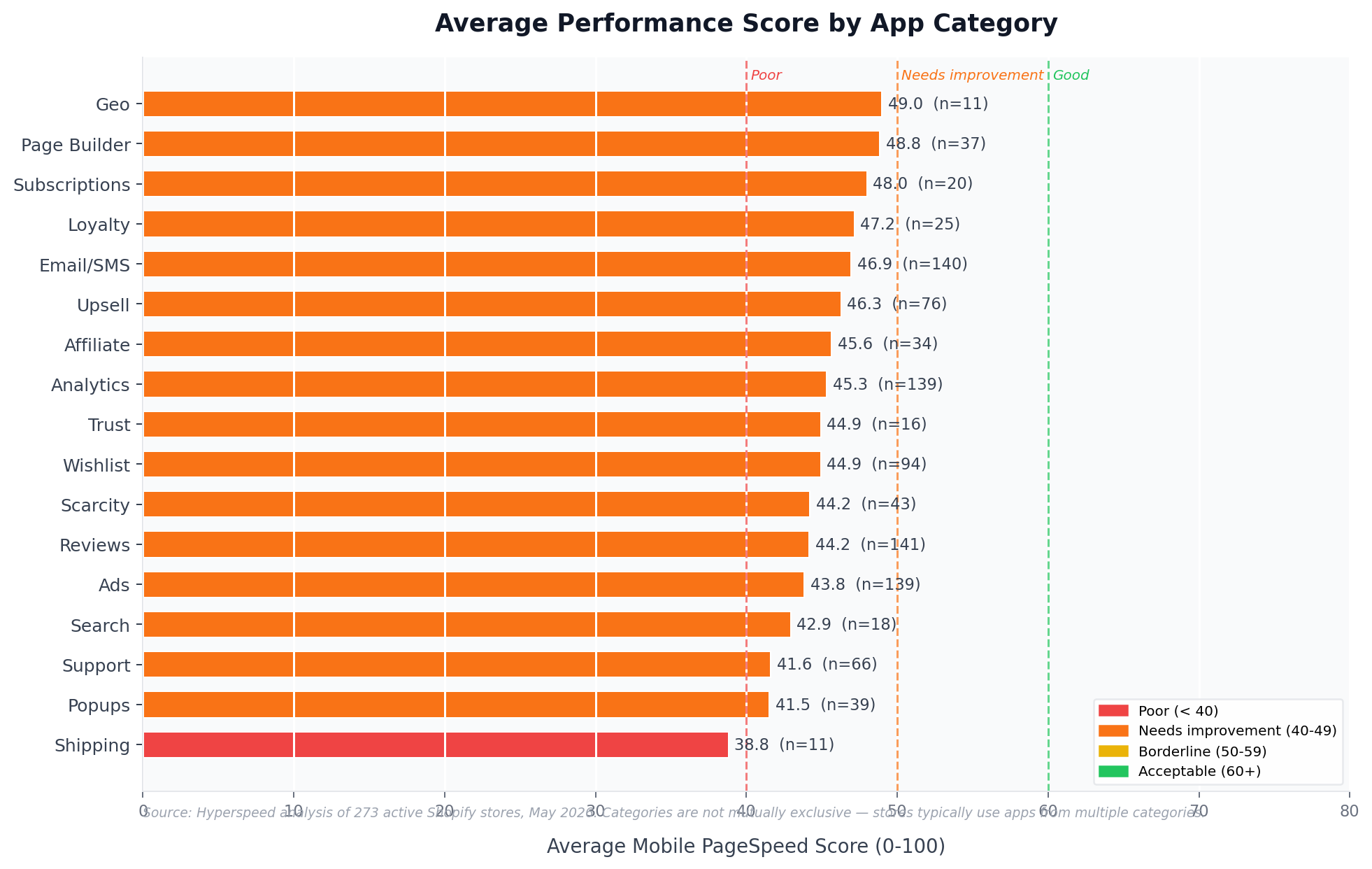
Which App Categories Correlate With the Lowest Performance?
Not all apps affect performance equally.
A lightweight wishlist app and a session recording platform both count as one install inside Shopify admin, but their frontend cost can be dramatically different.
Across our analysis, several categories consistently appeared among the slowest-performing storefronts.
Session Recording and Heatmaps
Tools like Hotjar, Microsoft Clarity, and Heap continuously observe user behavior in real time. These systems attach event listeners across the page, monitor interactions, track scrolling, and capture DOM changes throughout the browsing session.
This creates continuous frontend activity throughout the browsing session.
Chat and Support Widgets
Support tools often load large JavaScript bundles, initialize UI frameworks, and maintain persistent connections for live chat functionality.
In our previous script-level analysis, we found that Gorgias Chat loaded more than 600KB across 11 child scripts and contributed roughly 2.2 seconds of JavaScript execution time.
Upsell and Personalization Engines
Recommendation systems are computationally expensive because they frequently:
- monitor cart state
- observe page changes
- dynamically inject product recommendations
- and re-render interface components during interaction
These tools are often highly effective commercially, but they are also among the heaviest contributors to main-thread blocking.
Analytics and Ad Tracking
Tracking systems appear deceptively lightweight individually, but stores rarely install just one.
Instead, analytics stacks compound:
- Google Analytics
- GTM
- Meta Pixel
- TikTok Pixel
- LinkedIn Insight Tag
- affiliate tracking
- and attribution platforms
Each script adds listeners, network requests, and execution overhead that accumulate during page load.
The important distinction is this:
The number of apps installed matters less than the amount of JavaScript work those apps force the browser to perform.
Finding 4: Do Shopify Apps Slow Down Your Store? The Data Says Yes
This is the core finding of our research.
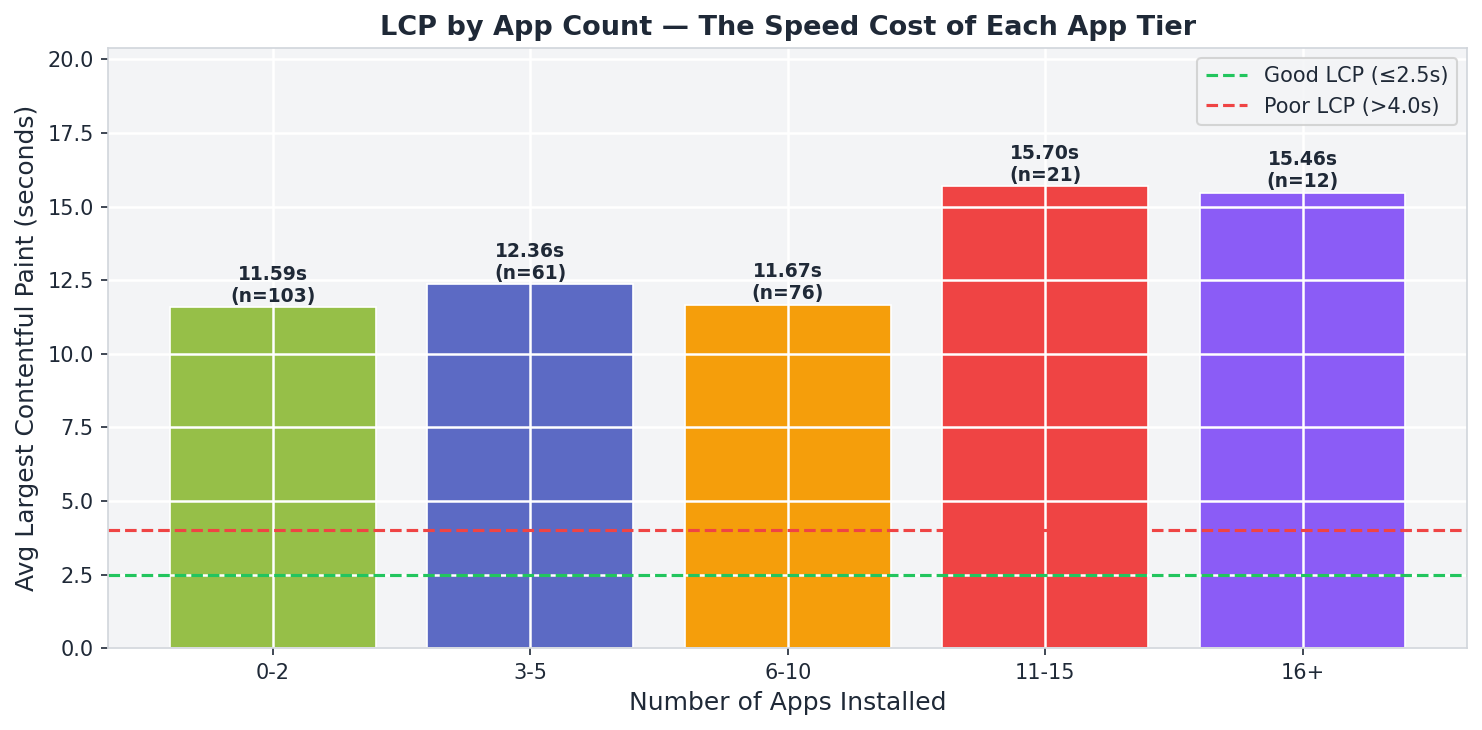
We matched app counts to PageSpeed performance scores for 273 stores. The results were consistent across every bracket.
| Apps Installed | Average Performance Score |
| 1 to 2 apps | 53.2 / 100 |
| 3 to 5 apps | 49.8 / 100 |
| 6 to 10 apps | 45.2 / 100 |
| 11 to 15 apps | 38.8 / 100 |
| 16 or more apps | 38.3 / 100 |
This is the clearest pattern in the dataset.
Stores running 1 to 2 detectable apps averaged a mobile PageSpeed score of 53.2. Stores running 16 or more apps averaged 38.3. That is a 15-point decline, moving from borderline acceptable performance into Google’s poor performance range.
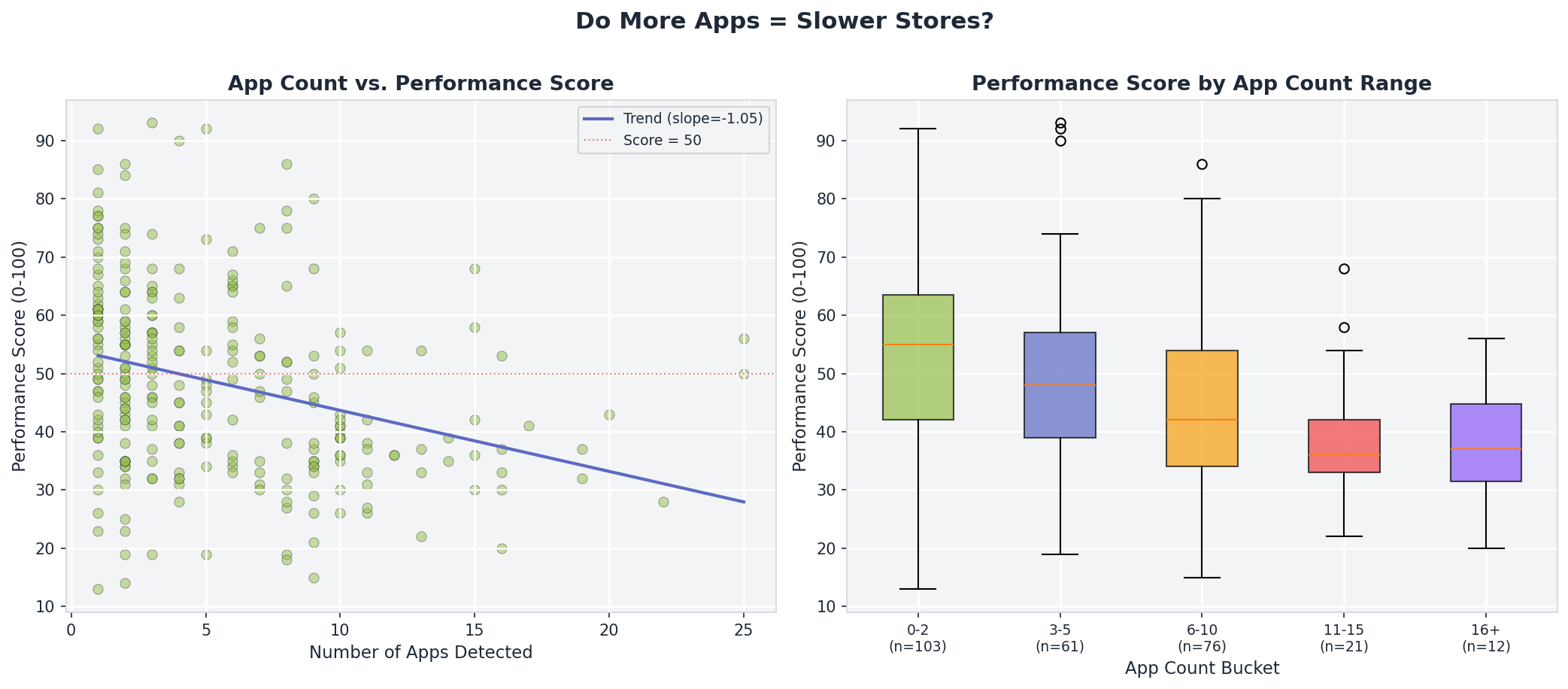
But the drop is not linear.
The steepest decline happens early, particularly between the 1-2 app tier and the 3-5 app tier. By the time stores reached the 6-10 app range, the average score had already fallen to 45.2.
That suggests the first wave of frontend tooling has a disproportionate impact relative to what comes later. Once multiple third-party systems begin competing for browser resources simultaneously, performance degradation compounds aggressively.
This finding is consistent with what we observed in our previous large-scale analysis across 1,166 storefronts, where the average mobile PageSpeed score was just 30 out of 100. That dataset leaned toward larger and higher-traffic brands, which typically operate more complex frontend stacks. The directional finding across both studies remains consistent:
Shopify infrastructure itself is generally fast.
The browser is where performance collapses.
Merchants often think about apps individually:
- one review platform
- one popup app
- one analytics tool
- one upsell engine
But the browser experiences them collectively.
Every additional script increases:
- parse time
- execution time
- network requests
- memory pressure
- layout recalculations
- and interaction latency
The result is a form of incremental complexity that accumulates silently over time, until storefront responsiveness begins deteriorating across the entire browsing experience.
Importantly, not all apps carry the same cost. Two stores may each have five apps installed while loading vastly different amounts of JavaScript.
But at the ecosystem level, the pattern is still clear: as frontend complexity increases, storefront performance consistently declines.
The Cost Is Paid on Every Page Load
The reason Shopify apps slow down your store is not always obvious. The performance numbers above reflect something worth making explicit.

Every app in your stack loads on every page view, for every visitor, whether or not that visitor ever interacts with the feature.
The chat widget loads for the customer who never opens it.
The upsell tool loads for the customer who buys immediately without needing a recommendation.
The loyalty app loads for the first-time visitor who has no points to redeem.
This is not a flaw in how apps are built. It is how the web works. Scripts declared in a theme load globally unless specifically restricted. Most app developers do not restrict by page or by user state by default, because doing so requires additional configuration that most merchants never set up.
The result is that every install accumulates silently. You add an app to solve a specific problem. The problem gets solved. You move on. The app keeps loading.
Over time, the stack grows and the store slows. Not dramatically in any single step, but consistently, install by install, until a store that launched fast is now sitting in the high 30s on PageSpeed and nobody is quite sure when or why it happened.
What to Do About It
Shopify apps slow down your store gradually, not all at once. Most of the tools in our top 20 exist because they solve real problems and generate real revenue. The goal is not to run zero apps but to make sure every app in your stack is earning its performance cost.

A few places to start:
Audit for abandoned apps. The most common source of unnecessary load is apps that are no longer actively used. A previous review platform, a chat tool from a support system you switched away from, a pixel for an ad network you stopped running, all still loading on every page. Removing an unused app costs nothing and recovers the full load it was contributing.
Check for duplicates. Four competing review apps appear in our top 10. If you migrated platforms and left the old one installed, you are paying the performance cost of both.
Look at what loads where. Some apps allow you to restrict loading to specific pages or conditions. An upsell widget that only appears on product pages has no reason to load on your blog or your homepage.
Understand the difference between install count and load cost. Two apps can have very different performance footprints. A lightweight wishlist tool and a full session recording platform are both single installs in your Shopify admin. They are not equivalent in what they cost the browser.
That is exactly why we built Hyperspeed.
Hyperspeed helps reduce frontend load by:
- deferring third-party scripts and apps
- lazy loading and compressing images
- reducing render-blocking resources
- improving Core Web Vitals
- and optimizing how storefront assets load across the browser lifecycle
Instead of manually hunting through theme files, app embeds, and tag containers trying to figure out why the storefront suddenly crawls, Hyperspeed automates much of the optimization layer directly inside Shopify.
You can test it yourself with a free 7-day trial.
Compare how fast your store is to a huge sample of other stores. Get benchmarked and find out where you can improve your speed to make more sales. How fast is your Shopify store?
FAQ
How many Shopify apps does the average store have?
The average Shopify store in our dataset ran nearly 6 detectable Shopify apps, while the median store used 4. Larger brands often operate heavier app stacks with more third-party apps for email marketing, product reviews, analytics, and cart customization across the Shopify ecosystem. App counts varied widely.
Do Shopify apps slow down store performance?
Yes. Our research found that Shopify apps slow down store performance as app count increases. Stores with 1 to 2 installed apps averaged better website speed scores than stores running 16 or more apps, where JavaScript execution and frontend complexity became major performance issues across the storefront.
What types of Shopify apps affect website speed the most?
Third-party apps tied to analytics, session recording, live chat, upsells, and email marketing created the largest website speed impact in our dataset. These app categories continuously execute JavaScript, add network requests, and expand the frontend workload across apps on Shopify and the broader Shopify ecosystem.
Is there an app limit for Shopify stores?
There is no strict app limit inside the Shopify App Store, but too many apps can create serious performance issues over time. The real constraint is not app installation itself, but how many installed apps load scripts, trackers, and widgets across the storefront simultaneously during page render.
How can Shopify merchants reduce app-related slowdowns?
Shopify merchants can improve store performance by auditing unused installed apps, removing duplicate tools, limiting unnecessary third-party apps, and restricting scripts to specific pages. Managing app usage carefully helps maintain faster website speed as store growth and app installs increase.